Email Delivery Issues: Causes, Diagnosis and Fixes
Learn the causes of email delivery issues, how to diagnose spam placement and missing mail, and the thresholds to fix first.
A campaign dashboard can show almost every message as delivered while prospects never see a single email. That's not a reporting glitch. It's the normal gap between a receiving server accepting mail and a mailbox provider placing it where someone reads it. Most email delivery issues live in that gap, and they stay invisible until replies dry up.
Why Delivered Does Not Mean Seen
A delivery rate can look healthy while prospects never see the message. Validity's worldwide 2025 benchmark found that 87.2% of legitimate email reached the inbox, 6.1% went to spam, and 6.6% was missing or otherwise failed to arrive, according to Validity's worldwide 2025 benchmark data. Roughly one in eight messages missed the inbox.
Track three outcomes separately. Inbox placement means a message reached the inbox. Spam placement means the receiving server accepted it but filtered it into spam. Missing mail means the recipient could not find it in any folder.
| Outcome | What It Means | 2025 Global Share |
|---|---|---|
| Inbox | Placed in the inbox | 87.2% |
| Spam folder | Accepted by the server but filtered into spam | 6.1% |
| Missing or failed | Did not arrive or could not be found in a recipient folder | 6.6% |
What the Split Costs a B2B Campaign
Applied to 1,000 messages, the benchmark means about 61 reach spam and 66 go missing. That leaves 127 prospects per thousand without a message they can read, even if the sending platform reports a high delivery rate.
For B2B outreach, that gap can distort campaign performance. A short list of decision makers may carry much of the pipeline value, so losing messages before they are read can change the economics of a send.
The benchmark's trend data shows that missing mail fell from 9.8% to 6.6%, while spam placement shifted from 6.7% to 6.1%, according to Validity's worldwide 2025 benchmark data. Fewer messages went missing, but spam placement changed little.
Reporting rule: Track inbox placement and missing-mail rate alongside accepted and non-bounced messages. Delivery rate alone cannot show whether a recipient saw the email.
Sender reputation, recipient engagement, authentication, complaint rates, list quality, and provider filtering can all affect placement without generating a bounce. A clean bounce report can therefore coexist with a campaign that gets no replies.
Match Each Symptom to Its Likely Cause
A high acceptance rate can hide several different failures. The pattern of bounces, replies, and placement by provider helps narrow the cause before any change is made.
| Symptom | Likely Cause | What the Pattern Indicates |
|---|---|---|
| Hard bounces on the first send | Invalid or unverified addresses in the list | Addresses may not exist, or their domains may not accept mail |
| Soft bounces or deferrals | Throttling, temporary server errors, or volume spikes | The receiving server is delaying or temporarily rejecting messages |
| No bounces but no replies | Spam-folder placement or low trust in a new sending domain | Messages may be accepted without reaching the inbox |
| Placement drops at one provider only | Provider-specific filtering or complaints from that provider's users | The problem may be limited to one provider rather than affecting all recipients |
| Complaint spike after a new list | Weak targeting or poor relevance | A particular segment or list source may be prompting complaints |
| Authentication passes but mail still fails | Transport security or certificate problems between servers | Authentication records can pass while delivery fails during server-to-server transport |
How to Read Each Row
Read symptoms as patterns, not diagnoses. A hard bounce points toward address or recipient-domain problems; a deferral points toward temporary rejection. No bounces combined with no replies is less specific, since accepted mail may be filtered or a new domain may lack trust.
Provider differences narrow the picture. If placement falls at one provider while it holds elsewhere, a provider-specific issue is more likely than a campaign-wide failure. A complaint spike isolated to a newly added list segment points toward targeting or relevance.
Consider a campaign with no hard bounces and no replies. If placement tests show messages in spam at one provider but in the inbox at others, the evidence points to provider-specific filtering, not a broken address list. If tests show inbox placement everywhere, the symptom does not establish a delivery failure; replies depend on other factors too.
Authentication results have limits. A message can pass SPF, DKIM, and DMARC checks yet fail during transport because of a security or certificate problem between mail servers. That failure will not look like an ordinary spam-placement issue.
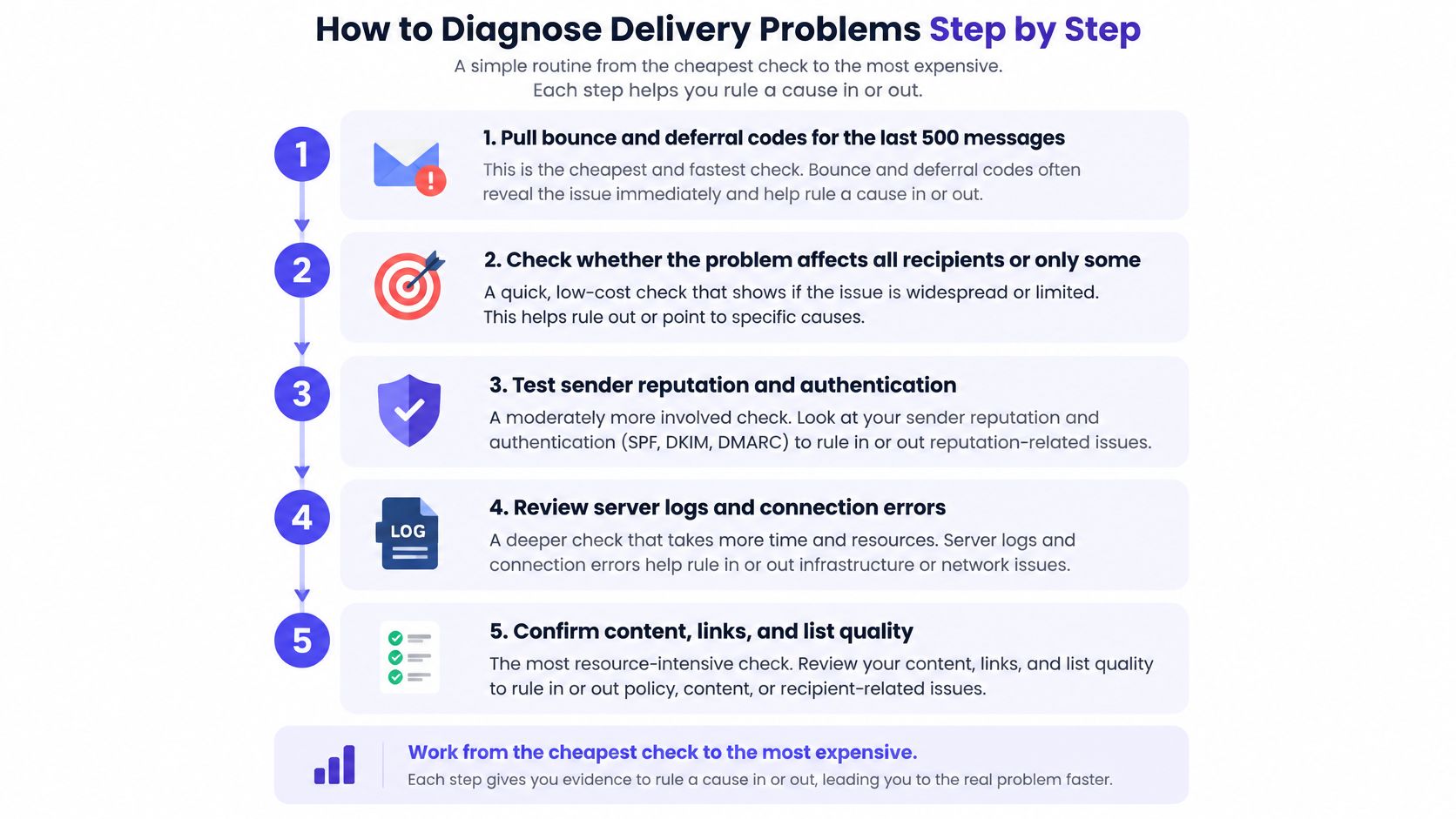
How to Diagnose Delivery Problems Step by Step
Diagnosis runs from the cheapest check to the most expensive. Each step either rules a cause in or rules it out. Skipping ahead to infrastructure changes before reading bounce codes is how teams burn good domains.
The Six Step Routine
- Pull bounce and deferral codes for the last 500 sends. Group them by type before reading individual messages. A cluster of invalid-address codes is a list verdict, while a cluster of deferrals points at rate or reputation.
- Confirm SPF, DKIM, and DMARC pass for the sending domain. The visible sender must match the authenticated domain. The common mistake is checking that records exist without checking a delivered message header for actual passes.
- Check complaint rate by sending domain and campaign segment. Use provider postmaster tools and read the daily figure, not only a monthly average. Averages hide the single bad day that damaged the domain.
- Send seed tests to real inboxes at each major provider. Record inbox, spam, or missing for every test address. One provider's result says nothing about the others.
- Compare placement by provider. A split pattern, strong at one provider and weak at another, points to provider filtering. A uniform drop everywhere points to domain reputation or content.
- Check transport logs and certificate or DNS consistency. Any domain still failing after the first five steps needs this layer examined. This is the step many senders skip because authentication already passed.
List quality sits underneath several of these steps. A clean lead generation list reduces invalid addresses before they turn into bounce clusters, which makes every later signal easier to read. Diagnosis gets harder when list noise and reputation damage arrive together.
Where the Routine Usually Breaks
Most failed diagnoses share two habits. The first is reading an aggregate dashboard as proof of inbox placement, when it only proves server acceptance. The second is testing a single inbox, usually the sender's own, and generalizing from it.
Test where prospects actually receive mail. A seed result from one provider is a data point, not a placement rate.
The decision at the end is simple. If the problem is list or targeting, fix the list first. If it's reputation, reduce volume and rebuild slowly. If it's transport, escalate the DNS or policy fix to whoever owns that layer. Sending more volume during diagnosis makes every one of those problems worse.
Authentication Rules That Gate Your Email
Authentication gates delivery; it does not improve ranking. Since the 2024 rule changes, a missing record or a failed alignment can stop acceptance before content, copy, or engagement get a chance to matter.
| Requirement | Applies To | Threshold or Condition |
|---|---|---|
| SPF or DKIM | Any sender delivering to Gmail accounts from February 1, 2024 | Valid forward and reverse DNS records also required |
| SPF, DKIM and DMARC | Bulk senders | Alignment between the authenticated domain and the visible sender |
| Bulk sender volume | Defines when stricter rules apply | At least 5,000 messages to Gmail addresses in one day |
| One-click unsubscribe | Bulk senders | Supported and honored promptly |
Google's sender guidelines set that floor: from February 1, 2024, mail to Gmail accounts needs at least SPF or DKIM plus valid forward and reverse DNS, and crossing 5,000 messages to Gmail addresses in one day makes alignment and one-click unsubscribe mandatory. Complaint-rate limits sit with reputation rules rather than record checks.
Why Alignment Fails Quietly
A visible From address on the brand domain can still fail DMARC when SPF authenticates only the sending platform's bounce domain. The return path passes, while the domain the recipient sees never authenticated. DMARC then has one path left: a DKIM signature on the brand domain. If that signature is absent, a bulk sender can show SPF as valid in a checker and still fail the requirement that decides delivery.
Record existence and aligned passes are different things. Headers from a real test message settle which domain each mechanism authenticated.
Setup Order for a New Domain
- Publish SPF and DKIM for the exact sending domain.
- Add DMARC at a monitoring policy so reports arrive before enforcement.
- Confirm forward and reverse DNS resolve correctly.
- Send a test message and read the headers for aligned passes.
- Increase volume only after those checks come back clean.
Transport Security Failures Behind Passing Records
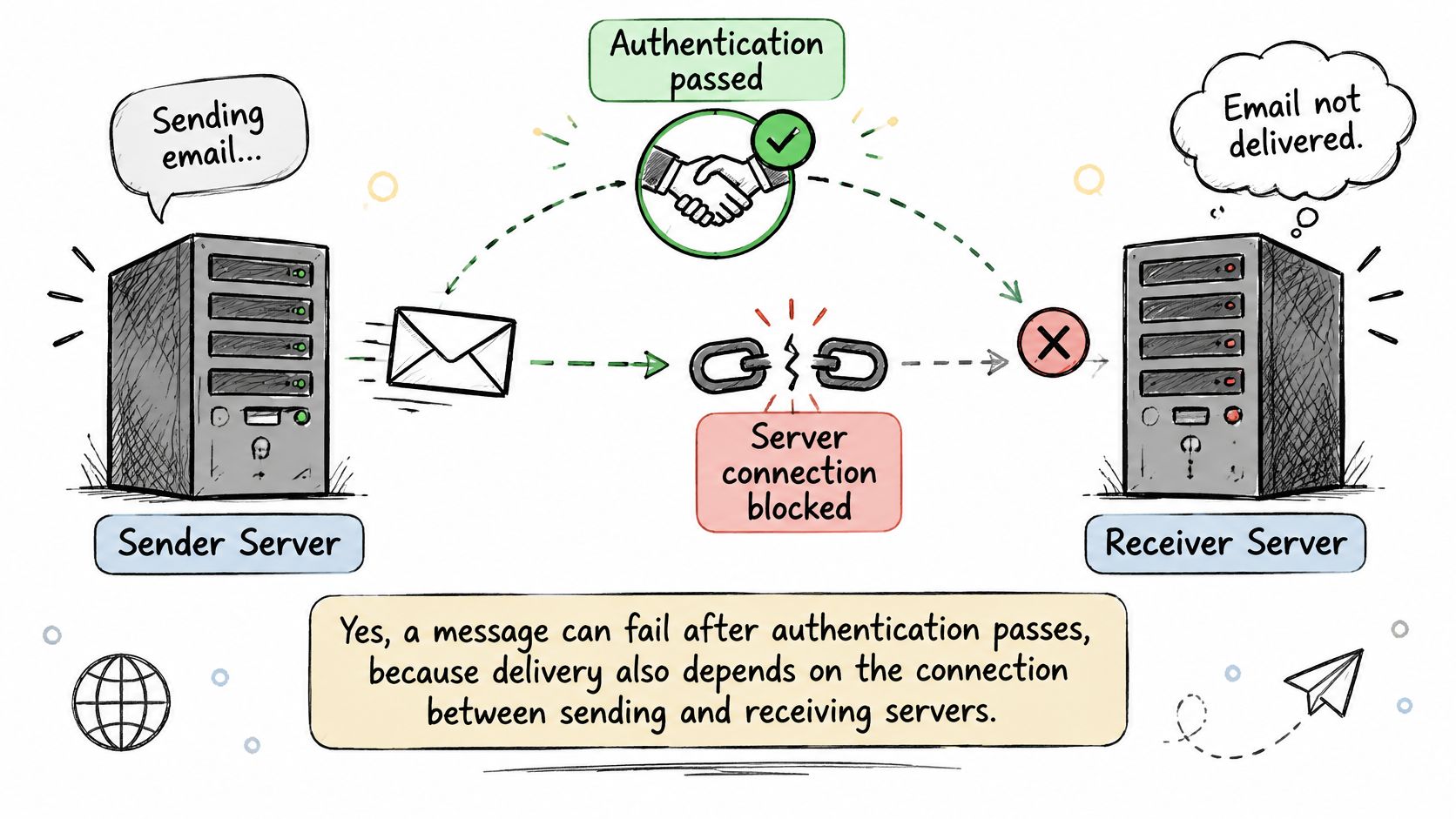
Can email fail when SPF, DKIM, and DMARC all pass? Yes. Authentication proves identity. It says nothing about whether the connection between sending and receiving servers completes correctly.
The Layer Most Checklists Skip
MTA-STS tells sending servers that a domain requires encrypted transport and where to fetch the policy. That policy lives on a policy server, and fetching it requires a working TLS handshake with a valid certificate. If the policy file, certificate, or DNS records disagree, a supporting sender can fail delivery rather than send in the clear.
A 2026 measurement study of MTA-STS configuration found that 29.6% of domains with an MTA-STS record were incorrectly configured, and 3.2% of those domains were expected to encounter delivery failure with supporting senders. The same study reported that 35% of self-managed policy servers failed to complete the TLS handshake, compared with 3.9% of third-party policy servers. Between 70% and 85% of observed errors were related to misconfigured policy servers.
Those numbers describe a specific failure mode. The domain owner added a security control, the control created a new dependency, and the dependency broke without warning. Nothing in a standard authentication check surfaces it.
A security record that's misconfigured doesn't fail open. For supporting senders, it can fail closed and take legitimate mail with it.
The Transport Checklist
- Match the record to the policy file: The published record and the hosted policy must describe the same hosts and mode.
- Verify the certificate: Check validity and expiry on the policy server, not just on the main website.
- Test the handshake externally: A connection test from outside the network catches failures internal checks miss.
- Read TLS reporting data: Reports show which senders hit errors and where.
- Confirm DNS consistency: Records must agree across name servers before escalating to the policy provider.
Self-managed policy servers carry the higher failure rate in the measurement, which makes ownership the practical question. Somebody has to monitor expiry dates and policy changes. If nobody owns that job, the first symptom is missing mail from senders that enforce the policy.
Complaint Rates That Quietly Cap Your Reach
At a 0.1% complaint rate, one recipient in every 1,000 delivered messages reports the email as spam. At 0.3%, that's three per thousand. Those small numbers control whether the next thousand messages reach an inbox at all.
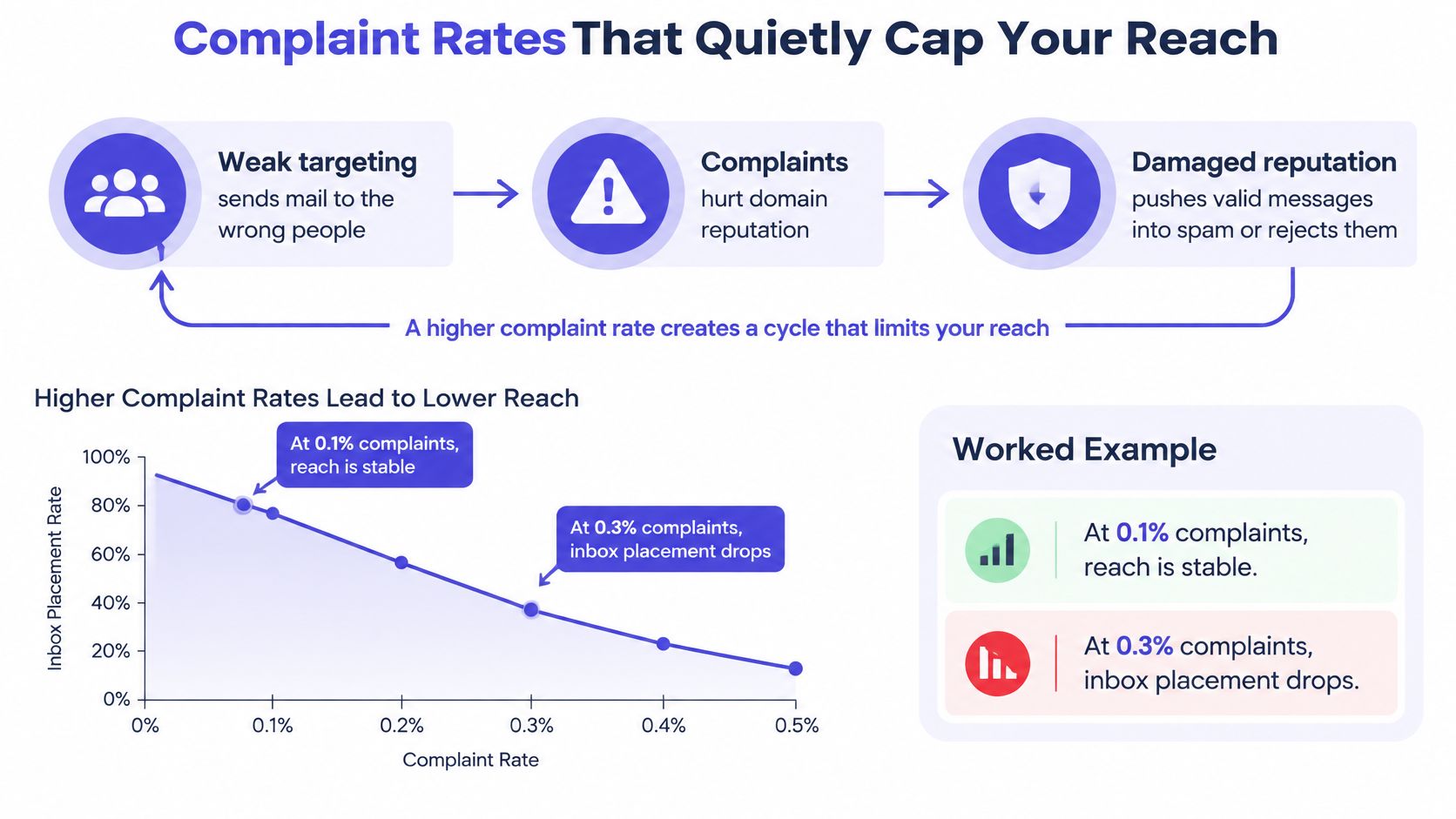
Gmail's guidance on spam rate limits advises senders to keep the user-reported spam rate below 0.1% and avoid reaching 0.3%, the point at or above which bulk senders can lose access to delivery mitigations. Gmail calculates the rate daily. A healthy monthly average can hide one damaging day.
The Feedback Loop
The loop runs in one direction. Weak targeting sends mail to people who never wanted it, and some of them click report spam instead of delete. Those complaints attach to the sending domain's reputation. Damaged reputation then pushes later messages, including relevant ones to well-matched prospects, into spam or gets them rejected.
The loop is cumulative and it doesn't reset when a new campaign launches. A domain carries its complaint history into every send. That's why a single poorly sourced list can suppress results for weeks after the list itself is gone.
The Operating Routine That Prevents It
- Monitor by domain and segment: A blended rate hides the one segment causing the damage.
- Throttle toward 0.1%, not at 0.3%: Waiting for the enforcement boundary means acting after reputation already dropped.
- Suppress immediately: Unsubscribed and invalid recipients come out of every active sequence the moment the signal arrives.
- Keep sender identity recognizable: Recipients report mail they can't place. A familiar name and consistent From address reduce reflex complaints.
- Honor unsubscribes promptly: Every extra message after an opt-out invites a complaint instead.
Diagnostic question: Is the complaint rate concentrated in one list source, which points to targeting, or spread evenly across segments, which points to volume or cadence?
Concentrated complaints get a list fix. Even complaints get a sending fix. Confusing the two leads to cutting volume on a good domain or keeping a bad list in rotation, and both mistakes extend the damage.
How Inbox Placement Varies by Mailbox Provider
Placement isn't one number. It's a different number at every provider, and the spread is wide enough to change campaign planning.
| Mailbox Provider | Inbox Placement | Reading Note |
|---|---|---|
| Gmail | 89.8% | Highest placement in the benchmark |
| Yahoo | 87.3% | Close to the global figure |
| Apple | 82.0% | Below the global figure |
| Microsoft | 77.4% | Lowest placement in the benchmark |
| Global | 87.2% | Blended figure across providers |
The 2025 provider placement benchmark measured global inbox placement at 87.2% in 2025, with 89.8% for Gmail, 87.3% for Yahoo, 82.0% for Apple, and 77.4% for Microsoft. Microsoft placement trails Gmail by more than twelve points in the same measurement.
What the Spread Does to a Real List
B2B lists rarely rely on a single provider. Corporate prospects often receive mail through Microsoft-hosted domains, while smaller firms and personal addresses lean toward Gmail and Apple. The mix determines the practical placement ceiling before copy or offer quality comes into play.
Say 60% of a prospect list sits on Microsoft-hosted domains and 40% on Gmail. The expected blended placement works out to about 82.4%, from 0.6 times 77.4 plus 0.4 times 89.8. That sits well below the 87.2% global figure with identical copy and identical sending setup.
A team judging that campaign against the global benchmark would call it underperforming and start changing variables. The explanation is list composition. This is exactly how one aggregate number hides a weak segment, and it's a common trap in lead generation for SaaS lists that mix enterprise Microsoft domains with startup Gmail addresses.
How to Read Provider Data
Compare placement by provider, sending domain, authentication status, complaint signals, and reply behavior side by side. A provider gap that matches the benchmark pattern is structural. A provider gap far wider than the benchmark is a sender-specific problem worth chasing.
The benchmark is an industry sample, so any individual list will differ. Seed tests against each provider confirm which pattern applies. Aggregate dashboards can't answer that question, no matter how clean they look.
Fix the Cause Before You Resend
A resend is a test with a cost. If the cause is still live, the next send can read as delivered on the dashboard while seed inboxes show spam or missing mail, and the domain absorbs another reputation hit.
Fixes That Change the Outcome
- Complaint spike from one segment: Pause that segment, not the whole program. Trace the list source and targeting logic, remove the import or filter that produced the spike, then resume with a narrower audience that passed a relevance check.
- Transport failure: Hand the exact record, policy file, certificate, or DNS mismatch to the owner of the policy server. After their change, rerun the handshake check because a corrected policy can still fail against stale DNS or a rotated certificate.
- Reputation damage across providers: Cut volume hard and send only to engaged recipients while placement and complaint data stay clean. Rebuild in steps, with each step earning the next one.
If complaints spike in an imported segment of operations directors, the sequence is narrow: pause that import, keep replied and booked-call addresses away from the risky source, relaunch to roles with recent engagement, then hold volume until a seed test shows inbox placement.
The Confirmation Standard
Warm-up pacing after any fix follows measured placement and complaint data at each step. A ramp copied from another sender ignores the domain's current reputation.
A fix stays a hypothesis until a seed test shows the change on the affected provider and segment. That pause costs one send cycle. Resending on hope costs the domain.
Confirm Your Delivery Numbers Before You Scale
Scaling volume on unverified numbers multiplies whatever is already wrong. The go or no-go decision needs evidence on five points before volume increases.
The Pre-Scale Checklist
- Placement measured by provider: Inbox, spam, and missing rates from seed tests, not accepted rates from the sending dashboard.
- Authentication passing with alignment: Confirmed in real message headers on the actual sending domain.
- Complaint rate below threshold by segment: Held across the last several days, since providers calculate daily.
- Unsubscribe and suppression working everywhere: Every sequence, upload, and CRM sync respects the same suppression list.
- Transport checks clean: Policy records, certificates, and DNS consistency verified.
Compliance sits inside that fourth item. The FTC CAN-SPAM compliance guide requires every commercial message to include a valid physical postal address and a clear opt-out method, and the opt-out mechanism must remain capable of processing requests for at least 30 days after the message is sent. Requests must be honored within 10 business days. An unsubscribe handled manually at the end of a sequence fails that standard and invites complaints in the meantime.
Build It or Hand It Off
Teams with in-house deliverability skills can run this checklist daily, and disciplined B2B sales prospecting depends on exactly that routine. Teams without that capacity should test any provider against specific questions. Who owns DNS, warming, and placement testing? How is inbox placement measured by provider? What happens when complaints spike, and what happens to a domain that drops below threshold?
At IronPeak Marketing, co-founder Charlie Bennett handles operations, the tech stack, deliverability, and data enrichment. The partnership includes dedicated inbox management, and custom domains, dedicated inboxes, copy, data enrichment, and tracking systems deploy in under 15 days. Those are concrete claims a buyer can test against the checklist rather than take on trust.
The standard doesn't change with the provider. Placement by provider, aligned authentication, segment-level complaint control, and working suppression either exist or they don't. Email delivery issues get expensive when scaling starts before anyone verified which side of that line the setup sits on.
IronPeak Marketing builds the sending side properly from day one, with custom domains, dedicated inboxes, warming, and daily inbox management handled as part of a managed cold email service, so placement problems get caught in seed tests instead of in lost pipeline. Founders and service providers who want outbound volume without babysitting DNS records, complaint rates, and domain health can see how the system works at IronPeak Marketing.