Clean Email Lists: Remove Bad Addresses Before Sending
Learn how to clean email lists with bounce benchmarks, a five-stage workflow, and the checks that keep B2B outreach out of spam folders.
Email databases degraded by at least 28% in 2024, according to ZeroBounce's Email Decay Report for 2025, as reported by MediaPost. That reframes list cleaning: a database isn't a durable asset unless someone maintains it. Verification at collection doesn't protect a campaign launched after employees leave, companies change domains, or recipients opt out.
For B2B founders and high-ticket service providers, clean email lists are an infrastructure responsibility. The work includes verification, job matching, central suppression, authentication, and complaint monitoring. A smaller export with traceable records is more useful than a larger list that creates delivery failures across dedicated sending inboxes.
Benchmarks and Bounce Rules
Clean list benchmarks and the action each one triggers
| Metric | Benchmark | Source | Action when breached |
|---|---|---|---|
| Total bounce rate | Below 2% | B2B operating benchmarks | Investigate the source and revalidate before adding volume |
| Hard bounce rate | Under 0.5% is excellent | Same operating benchmark guidance | Suppress hard bounces at once and review sourcing |
| Average hard bounce rate | 0.05% | Validity's 2024 report, reporting 2023 averages | Reference point for a healthy send |
| Average soft bounce rate | 0.84% | Same Validity report and reporting period | Track soft bounces across attempts for patterns |
| Average sender bounce rate | About 1.06%, median 0.21% | Twilio SendGrid's 2023 benchmark findings, based on more than 5 trillion emails | Treat above-average performance as a trigger for investigation |
| Gmail spam complaint rate, target | Below 0.1% | Google sender guidance | Pause the affected segment and review targeting |
| Gmail spam complaint rate, limit | 0.3% or higher | Same Google guidance | Stop the segment and fix consent and relevance |
The operating benchmarks are triage rules, not regulatory limits. The gap between average and median sender bounce rates also matters: a smaller group of high-bouncing senders can pull the average upward. Matching an average doesn't prove that sourcing or delivery practices are healthy.
Separate permanent failures from temporary ones
A hard bounce generally means a permanent delivery failure, such as a nonexistent mailbox. Suppress it the same day and don't retry it automatically. A soft bounce can indicate a full mailbox, throttling, or another temporary or policy-related problem, so retain the response and examine patterns before choosing to retry, pause, or suppress.
For illustration, 10,000 messages at Validity's reported averages would produce about 5 hard bounces and 84 soft bounces. Those are reference calculations, not a forecast for an individual campaign.
A different hypothetical send producing 150 hard bounces from 10,000 messages has a 1.5% hard-bounce rate, three times the excellent-performance line. That source should stop before another batch enters the queue, even if total delivery initially looks acceptable.
Practical rule: A receiving server accepting a message doesn't prove inbox placement, relevance, or permission.
Track email delivery rate alongside permanent failures, temporary failures, and complaints rather than treating them as interchangeable.
Make suppression global
An opt-out must block enrollment across every mailbox, domain, and automation. Removing someone from a single sequence leaves other sending paths open.
Under the FTC's CAN-SPAM compliance guide, opt-outs must be honored within 10 business days, and the mechanism must remain operational for at least 30 days after sending. Operationally, processing requests immediately is safer than using the legal deadline as a queue.
Spotting Invalid, Risky and Outdated Addresses
An address that passed verification at collection can become unusable later. In 2025, 23% of addresses were classified as invalid or risky within one year, based on ZeroBounce's analysis of more than 11 billion verified addresses.
That finding describes the addresses analyzed, not a guaranteed deterioration rate for every B2B database. Its operational value is the warning: a previous validation result shouldn't be treated as permanent clearance.
Address types, signals and actions
| Address type | How to spot it | Action |
|---|---|---|
| Malformed syntax | Missing @, stray spaces, or invalid characters | Remove before import |
| Dead domain | Domain has no MX record | Remove from the campaign |
| Disposable domain | Known throwaway email provider | Remove or suppress |
| Role account | Addresses such as info@, sales@, or support@ | Remove or send only where campaign policy allows |
| Catch-all domain | Server accepts any address | Mark as risky and test a small segment first |
| Departed employee | Person no longer holds the target role at the company | Suppress after a job-change check |
| Closed mailbox | Hard bounce from an address that was previously valid | Suppress immediately |
A positive result can still leave uncertainty
Catch-all acceptance isn't mailbox confirmation. A server accepting arbitrary recipient names doesn't prove that the intended person has a working inbox. Keep that result separate from confirmed mailbox results rather than allowing the verifier's broad deliverability label to erase the distinction.
Role accounts require a different judgment. A shared sales inbox may be legitimate, but it usually isn't equivalent to a named decision-maker who matches the offer. Campaign policy should decide whether shared mailboxes belong in the audience before enrichment or copywriting begins.
Consider a hypothetical directory export containing 1,000 B2B contacts. If a later check flags 230 as invalid or risky, those records should enter review before the first send, not become a delivery experiment. That scenario illustrates the cited proportion without assuming that every directory list deteriorates identically.
Job changes deserve their own check because a mailbox can remain technically reachable after the original contact leaves. Sending personalized copy about a former employee's responsibilities creates a targeting failure even when the message doesn't bounce.
Classification belongs before sending. A bounce report identifies a failure after the sender has already incurred it.
How to Run the Five-Stage Cleaning Workflow
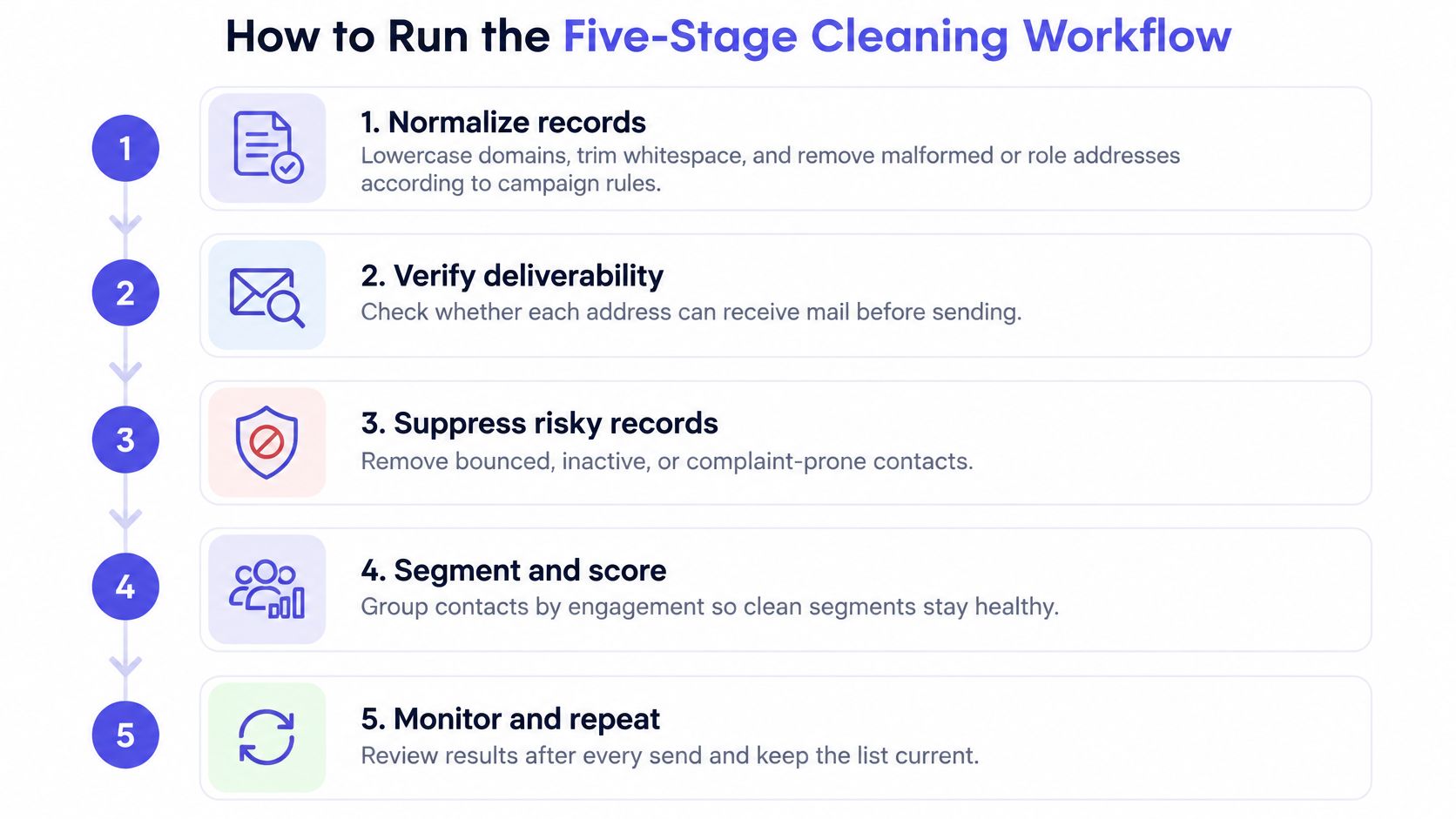
The cleaning workflow needs an auditable output, not just a smaller spreadsheet. Each rejected record should carry a reason, and each approved record should retain its source and validation status.
Prepare and validate the export
Normalize records. Lowercase domains, trim surrounding whitespace, and remove malformed addresses or role accounts excluded by campaign policy. This prevents spacing and inconsistent formatting from creating false duplicates, but the common mistake is rewriting ambiguous addresses instead of returning them for review.
Deduplicate and confirm job fit. Match on normalized email, then confirm that the person still belongs to the target company and job function. Duplicate rows inflate enrollment, while stale enrichment can attach convincing personalization to the wrong employer.
Run deliverability checks. Check syntax, domain and MX status, mailbox results, disposable providers, and known-risk classifications. Preserve the underlying result because the common slip is treating a catch-all response as confirmation that the named mailbox exists.
The sourcing process should support those checks. Useful prospect research tools provide evidence for company and role matching rather than merely adding more contact fields.
When duplicates contain conflicting information, merge deliberately. Keep the latest defensible employment evidence, retain acquisition history, and never let a newer import overwrite an older suppression status.
Apply exclusions before campaign enrollment
Join the export against suppression records. Exclude prior hard bounces, unsubscribes, spam complainants, and global do-not-contact entries across all sending systems. The usual failure is checking exclusions during import but allowing a follow-up automation to enroll the same person through another path.
Test before scaling. Send a small, clearly labeled segment and compare its delivery failures and complaints with the operating thresholds. A passing test stays below the total-bounce threshold, shows no complaint spike, and supports staged expansion rather than immediate release of the entire export.
Keep timestamped validation results, source tags, suppression history, and reason codes with the records. Store the campaign batch identifier too, so an operator can connect an unexpected failure pattern to the exact import and enrichment process that produced it.
A rejected lead shouldn't disappear into an unexplained deletion count. Distinguish invalid syntax from employment mismatch, disposable mailboxes, uncertain verification, and prior opt-outs because each requires a different correction.
Release condition: A verifier's approval is an input to campaign enrollment, not permission to bypass suppression or targeting checks.
Domain warming doesn't change that rule. Gradually introducing traffic cannot repair invalid addresses or make irrelevant outreach welcome, so warming should never become the explanation for releasing a questionable source.
After release, compare results by source and recipient domain rather than averaging everything together. A healthy established segment can otherwise conceal failures in newly collected records.
Cleaning a 10,000-Row Export in Practice
Consider a hypothetical 10,000-row export, not client results. The objective is to preserve qualified, usable contacts while making every exclusion explainable.
Normalization first removes 412 malformed or role addresses under the campaign's stated policy. Deduplication then removes 780 duplicate rows, leaving 8,808 records.
Follow the counts through the funnel
| Check | Illustrative records removed | Records remaining |
|---|---|---|
| Normalize and apply role-account policy | 412 | 9,588 |
| Deduplicate normalized email | 780 | 8,808 |
| Check current employer and title | 620 | 8,188 |
| Remove invalid addresses | 1,250 | 6,938 |
| Remove disposable domains | 180 | 6,758 |
| Apply existing suppression records | 96 | 6,662 |
The job-match check excludes contacts whose employer or title no longer fits. Verification then separates invalid and disposable addresses from the remaining records, including 900 catch-all results that require their own disposition.
For this example, none of those catch-all records overlaps with the existing suppression exclusions. That explicit assumption keeps the final arithmetic auditable rather than subtracting the same contact twice.
Hold the catch-all cohort outside normal enrollment and test 500 of its addresses separately. If that hypothetical test produces 6 hard bounces, its hard-bounce rate is 1.2%, more than twice the excellent-performance benchmark.
The catch-all cohort stays out of the next volume release. Its failed addresses enter suppression, and the uncertain remainder stays quarantined pending review rather than being blended into the healthier segment.
The remaining 5,762 sendable records move forward in stages. Cutting the export isn't lost productivity: it prevents the team from spending sending capacity and follow-up effort on records that failed explicit checks.
Authentication and Complaint Limits Providers Enforce
Gmail and Outlook.com sender requirements compared
| Requirement | Gmail | Outlook.com |
|---|---|---|
| Authentication | SPF or DKIM required, both for bulk senders | SPF, DKIM, and DMARC with at least p=none |
| Alignment | Visible From domain aligns with SPF or DKIM domain | Authentication aligned to the visible From domain |
| Volume trigger | Bulk senders | More than 5,000 messages a day to Outlook.com accounts, per Microsoft's high-volume sender requirements |
| Complaint rate | Keep below 0.1%, never reach 0.3%, as summarized in Gmail sender-requirement guidance | No numeric threshold specified in the cited Outlook.com guidance |
| Unsubscribe | One-click unsubscribe for marketing mail | No separate unsubscribe rule specified in the cited Outlook.com guidance |
A technically valid recipient address doesn't compensate for a sender identity failure. Authentication belongs in the release check because mailbox providers evaluate the sending domain and message, not just whether the recipient exists.
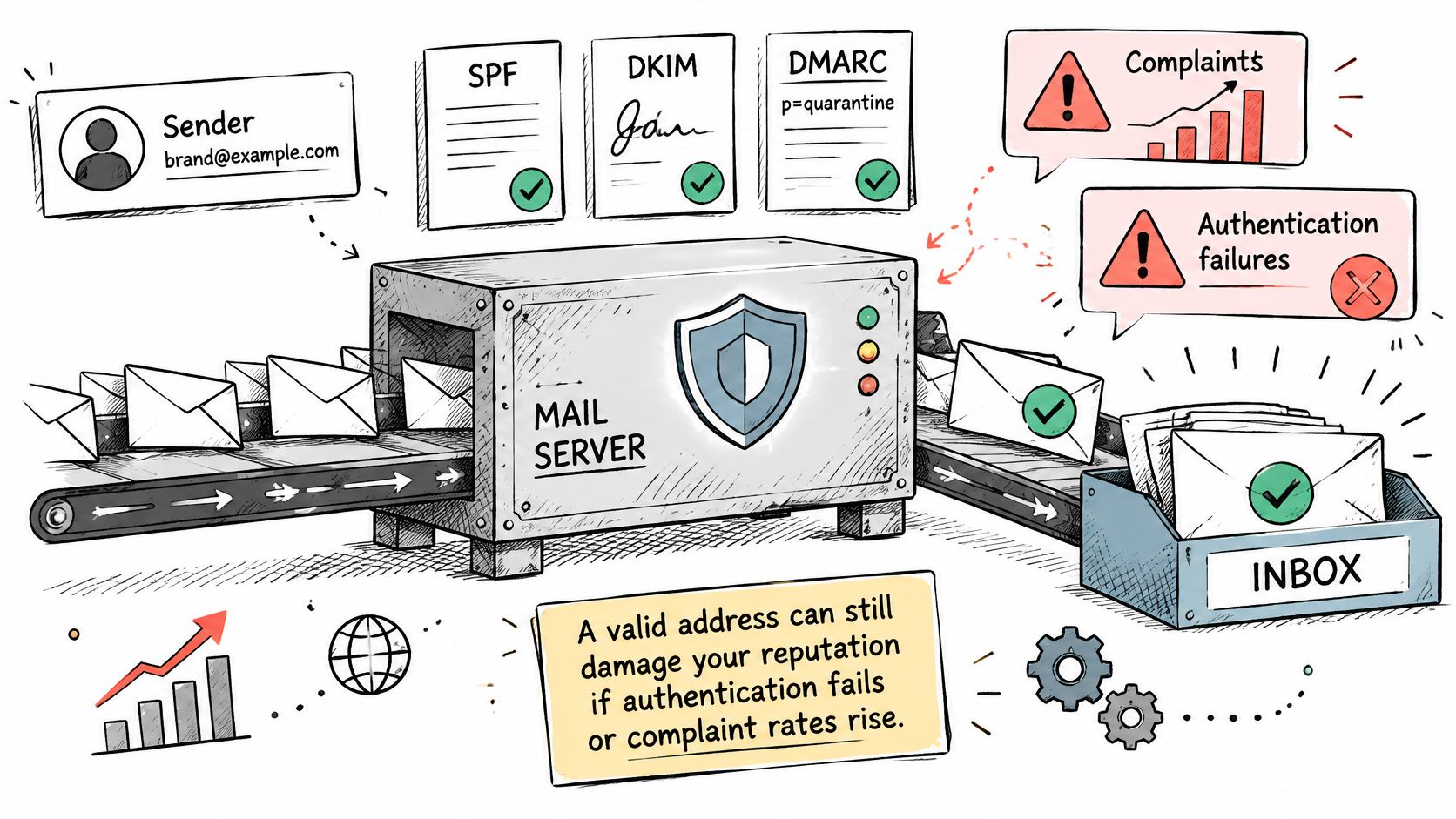
Check the message, not just the records
SPF identifies authorized sending hosts through DNS. A published record isn't enough if the actual sending service hasn't been authorized.
DKIM adds a verifiable message signature associated with the signing domain. Inspect a real outbound message to confirm that the intended domain signs successfully.
DMARC connects authentication to the domain visible in the From header. A p=none policy supports monitoring without instructing receiving providers to reject or quarantine failures; it doesn't turn failed authentication into a pass.
Alignment must hold on messages produced by the live sending workflow. A manually sent test from a different service can pass while the campaign automation fails.
Complete the pre-launch checks
Commercial messages also need accurate From, To, Reply-To, and routing information, a valid physical postal address, and a clear opt-out explanation. Those message mechanics belong beside email deliverability best practices, not in a separate copywriting review that happens after launch.
- Records published: Authorize each legitimate sending source and confirm signing.
- Alignment verified: Inspect the authentication results on a live test message.
- Unsubscribe tested: Submit an opt-out and confirm that enrollment is blocked.
- Complaints monitored: Assign an owner who can pause the affected segment.
Authentication proves aspects of sender identity. It doesn't establish consent or guarantee that recipients want the message.
Keeping the List Clean and Passing the Go or No-Go Check
List lifecycle checks and the trigger that acts on each
| Stage | Check | Trigger to act |
|---|---|---|
| At collection | Syntax, domain, and mailbox verification | Drop failures before import |
| Before activation | Recheck verification and job match | Records not validated since the last campaign |
| During sending | Hard bounces, soft-bounce patterns, and complaints per batch | Suppress hard bounces at once and pause batches above the complaint limit |
| After repeated non-engagement | Unsubscribes and no replies across sequences | Suppress inactive contacts; retain only necessary suppression information for opt-outs |
| Rolling review | Batch metrics against a 30–90-day baseline, following authentication and complaint-control guidance | Automatically stop sources that breach predefined limits |
Maintenance requires a decision about each record, not endless retention of every enriched field. Job changes, mergers, and domain migrations should trigger reassessment before dormant records return to active campaigns.
Decide what remains in the database
- Delete unnecessary invalid records: Remove information with no continuing operational or legal purpose.
- Suppress delivery failures and complainants: Preserve enough information to prevent renewed outreach and explain the exclusion.
- Review permission gaps: Where permission is required, obtain it through an appropriate lawful route rather than assuming an unsolicited re-permission email is acceptable.
- Minimize opted-out records: Retain the necessary suppression entry so a later import can't restore active status.
Non-engagement and unsubscribe aren't the same event. An inactive contact can receive an internal suppression reason without being falsely recorded as having opted out.
Privacy and direct-marketing rules vary by jurisdiction. These are operating practices, not legal advice, and retention decisions need to account for applicable obligations.
Require a release decision
IronPeak Marketing begins by analyzing the prospect's current situation, target market, and offer to decide whether its cold email system fits their growth goals. That assessment matters because no amount of cleaning can fix an audience that doesn't match the offer.
Charlie Bennett co-founded IronPeak Marketing and handles operations, the tech stack, deliverability, data enrichment, and the systems that keep leads flowing into clients' calendars. Those responsibilities connect list decisions to campaign execution rather than leaving hygiene as an isolated spreadsheet task.
Before release, the operator should confirm that the workflow passed, suppression reasons are recorded, authentication aligns on a live message, and the test segment meets its release criteria. Missing evidence means no-go, not permission to compensate with more inboxes.
The next action is concrete: export the current list, group it by source, run the cleaning workflow, and record the first batch's bounce and complaint outcomes. Keep timestamps and reason codes so later decisions rest on traceable evidence.
IronPeak Marketing offers managed B2B cold email outreach with prospect data collection, dedicated infrastructure, and inbox management. For founders and high-ticket service providers evaluating outbound, visit IronPeak Marketing to discuss whether the offer, target market, and current acquisition setup fit a managed cold email system.