Email Deliverability Best Practices: 8 Rules for 2026
Email deliverability best practices for B2B cold outreach: authentication, domain warming, complaint limits, list verification, and inbox placement testing.

“Warm the inboxes and improve the copy” is incomplete advice. A warmed mailbox can still send unauthenticated messages, contact stale addresses, or deliver an irrelevant sequence that recipients report as spam. Better copy won't repair those failures.
Cold email can fail before anyone reads it. A new sending domain with broken authentication, a mailbox pushed beyond its established sending pattern, or a poorly verified prospect list can create delivery problems before a founder has enough replies to evaluate the offer. Changing subject lines at that point treats the wrong problem.
For outbound programs using secondary domains and multiple mailboxes, deliverability is a system decision. Each domain needs a documented configuration, each mailbox needs its own sending limit, and every campaign needs shared suppression controls. Adding inboxes without those controls increases the number of places where failures can occur.
The distinction that matters is server acceptance versus inbox placement. A sending platform can report a message as delivered even when the recipient's provider puts it in spam.
A campaign isn't ready because its sequence is loaded. It's ready when authentication, recipient data, suppression, sending limits, and placement tests have passed.
These email deliverability best practices follow the operating order that matters: establish identity, separate infrastructure, introduce volume gradually, control recipient risk, and test what reaches the inbox.
1. Authenticate every sending domain with SPF, DKIM, and DMARC
Authenticate before warming or launching campaigns. Every secondary domain needs its own configuration, even when the same mailbox provider and sending platform serve the entire program.
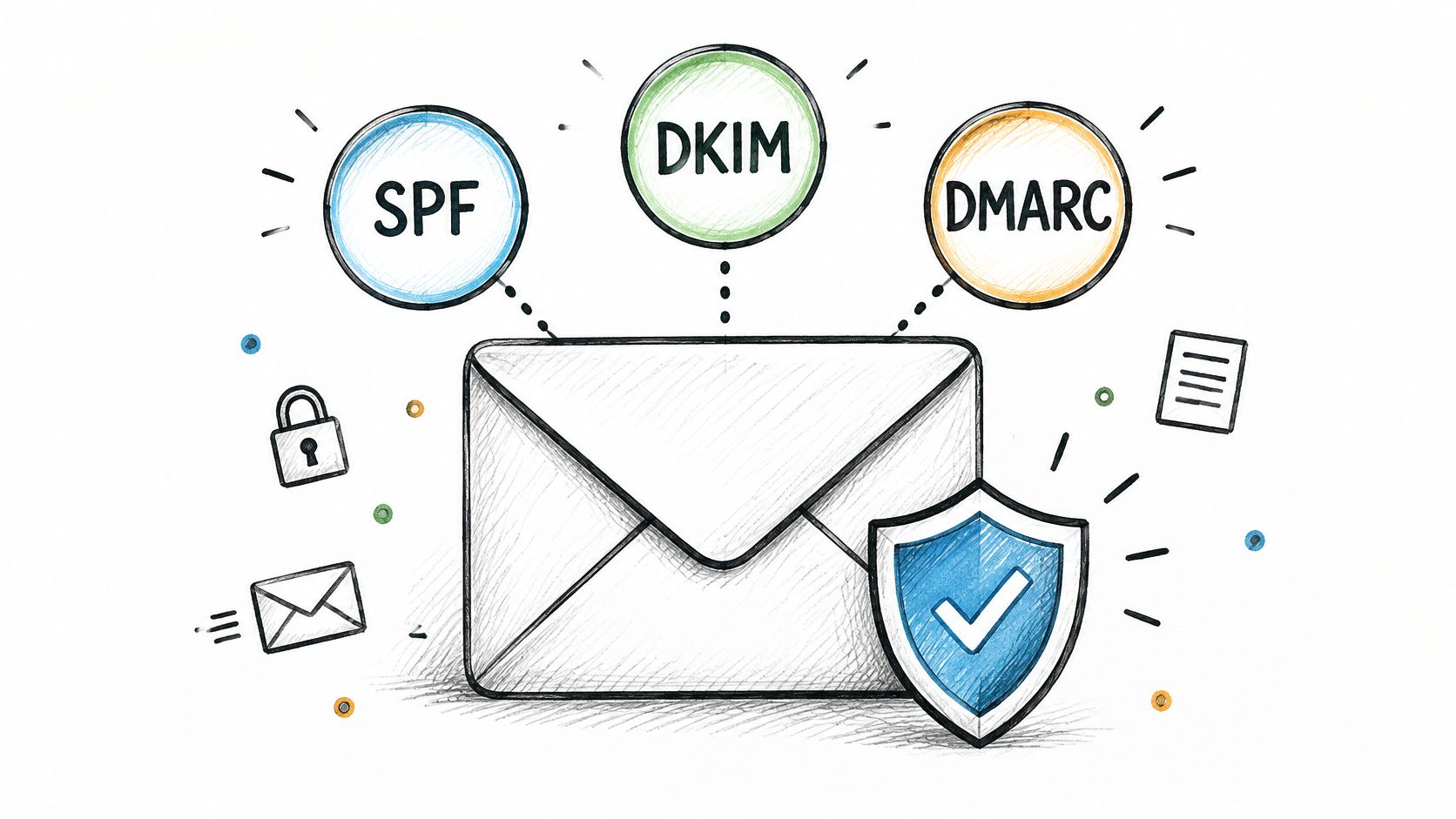
SPF identifies authorized sending servers. DKIM adds a signature that receiving servers can verify against a public key in DNS. DMARC checks whether an authenticated domain aligns with the visible From domain and publishes instructions for handling failures.
Google's email authentication guidance requires bulk senders sending more than 5,000 messages per day to configure SPF, DKIM, and DMARC. For a managed outbound program, implementing the complete stack below that threshold provides a consistent baseline rather than maintaining different standards across domains.
Test alignment, not just green checkmarks
A message can pass SPF through a provider's domain without that domain aligning with the address recipients see. Inspect a real test message's headers in Gmail and confirm the authentication results, signing domain, and visible sender agree.
- Start with monitoring. Publish DMARC with
p=noneand an aggregate reporting destination while legitimate sending sources are identified. - Inventory authorized services. Record SPF mechanisms, DKIM selectors, mailbox providers, and sending platforms for every domain.
- Check infrastructure settings. Confirm valid forward and reverse DNS through the provider and encrypted message transport.
- Tighten deliberately. Move toward quarantine or rejection only after legitimate traffic passes aligned authentication.
For example, an agency moving between sending platforms should validate the replacement platform's signing before removing the previous configuration. Switching vendors isn't complete when the inbox connects. It's complete when a newly sent message passes aligned authentication.
2. Run outbound on dedicated domains and inboxes, separate from your primary domain
Set the isolation boundary before the first prospect is loaded: one primary domain for billing, product and support, plus a small pool of secondary sending domains sized to the campaign. I cap a B2B program at 2 to 5 brand-adjacent domains and 2 to 4 mailboxes per domain. Past that, DNS work, suppression sync and reporting grow faster than the deliverability gain.
Buy those domains before the campaign needs them. A domain registered this week should carry ordinary correspondence first and prospecting traffic later; a few weeks of visible history gives DNS, DMARC reporting and mailbox activity time to exist before filters judge real volume.
Separate risk without disguising identity
Keep the primary domain on customer mail. Let secondary-domain mailboxes carry cold outreach and follow-ups, with sender names, signatures and company identity staying accurate.
The operator keeps reporting separate for each sending domain so a complaint spike cannot hide inside a campaign average.
- Domain ownership. Keep registration, DNS access, renewal responsibility and mailbox administration under documented control.
- Business identity. Use recognizable sender names and a clear explanation of the company behind the message.
- Health tracking. Attribute authentication failures, bounces, complaints and placement results to their originating domain and mailbox.
- Failure containment. Pause affected infrastructure without automatically moving its queued recipients elsewhere.
The trade-off is administrative overhead. More domains mean more DNS maintenance, testing, suppression synchronization and renewal management.
Treat each secondary domain as long-term infrastructure: a domain swapped every few weeks has no time to earn reputation and repeats the same failure. Stable ownership, clean targeting and controlled mailbox counts outperform a growing inventory of neglected domains.
3. Warm new domains and mailboxes gradually before they carry campaign volume
New sending infrastructure fails when volume arrives before reputation evidence. A secondary-domain mailbox earns campaign traffic through clean authentication, low bounces, inbox placement on seed tests, and replies that look like ordinary business mail while volume rises in steps.
Treat the ramp as an operator default, not a provider rule: for each mailbox, send 5–10 real emails per day on days 1–3, hold 15–25 per day on days 4–7, then move toward 30–50 per day in week 2 only after seven clean days. Keep prospecting under the daily mailbox cap while placement is watched. If deferrals, spam-folder placement, or a complaint cluster appears, drop back one step and fix the cause before resuming.
A warmup tool can catch DNS, signature, or content problems early. It cannot create relevance for recipients who never asked to hear from you, and it cannot excuse a breach of provider acceptable-use rules.

Use a readiness gate instead of a launch date
Gate progression on evidence. Advance only when authentication passes, test seeds land in inbox, deferrals stay at zero for the observation window, and replies and bounces remain inside expected bounds for that audience.
- Before sending. Validate SPF, DKIM, DMARC, signatures, reply routing, suppression sync, and seed placement.
- During the ramp. Review bounce reasons, provider deferrals, complaint traces, placement tests, and human replies per mailbox.
- Before increasing volume. Require seven clean days at the current step with no unresolved technical or recipient-quality problem.
- After a warning. Cut volume in half or pause that mailbox while isolating whether data, copy, or infrastructure caused it.
Readiness rule: A clean warmup dashboard doesn't outweigh poor placement from the actual campaign mailbox.
The trade-off is time. A slower ramp delays reach for a week or two; a rushed ramp can burn a secondary domain and force a rebuild that hides the same targeting problem under another name.
Build observation and correction into setup schedules. No launch date justifies sending through failed authentication, rising deferrals, or deteriorating inbox placement.
4. Hold spam complaints under the provider thresholds and treat complaints as a stop signal
A recipient marking a message as spam is reporting that the outreach was unwanted, misleading, or difficult to escape. The only useful response is to stop what generated the report.
Google's sender requirements say senders should keep user-reported spam below 0.1% and prevent it from reaching 0.3% or higher. Pause a segment at 0.1% and audit before resuming. On a shared sending domain, one bad list can pull the placement of every other segment down with it.
For a multi-domain program, the response must follow the source of the problem. A complaint cluster inside one audience segment calls for a list and offer review. Deterioration spread across unrelated segments points to infrastructure or campaign-wide causes instead.
Stop the segment that generated the complaints
Complaints that cluster in a new audience while older segments stay clean indict the targeting. The common version: a commercial consultancy expands outreach from its established buyer profile into unrelated businesses, and the new recipients push the complaint rate up while the original audience stays stable.
Moving that segment to a fresh mailbox only relocates the problem to another asset. The operator should stop it, inspect the qualification logic, and confirm the offer has a credible reason to reach those recipients.
- Audit selection. Check company fit, decision-making responsibility, geography, and the business problem behind the approach.
- Audit the sequence. Remove repetitive follow-ups that add pressure without adding useful context.
- Audit the exit. Confirm that recipients can opt out easily and that queued messages stop.
- Audit scope. Compare outcomes by segment, mailbox, sending domain, and receiving provider.
A clean bounce rate and a complaining segment can coexist. Deliverable addresses still produce unwanted outreach, and providers weigh the complaints far more heavily than the delivery.
A structured investigation of email delivery issues helps separate technical failures from recipient rejection. Resume only after the cause is corrected, and test the segment again at reduced volume before it rejoins the sending rotation.
5. Verify and clean every list before the first send
Run verification after enrichment, never instead of it. Enrichment confirms the prospect's company, role, and fit. Verification tests whether the address can still accept mail. A record can carry an accurate job title while pointing to an abandoned mailbox, and a deliverable address can belong to someone with no purchasing responsibility or connection to the offer.
Check syntax, domain validity, available mailbox-verification results, and suppression status before importing records into a live sequence. Store the verification result and its timestamp with the contact, so operators can tell a fresh validation from a database label applied months ago. Treat results older than 60 days as stale and re-verify before those records enter a campaign.
Hard bounces get a working ceiling. Keep them under 2% on any single send; if a batch crosses that line, pause the list, isolate the failing segment, and re-verify before the next send. Every failed attempt at a dead address costs the sending domain reputation it needs for the prospects who do exist.
Keep uncertain records out of the main queue
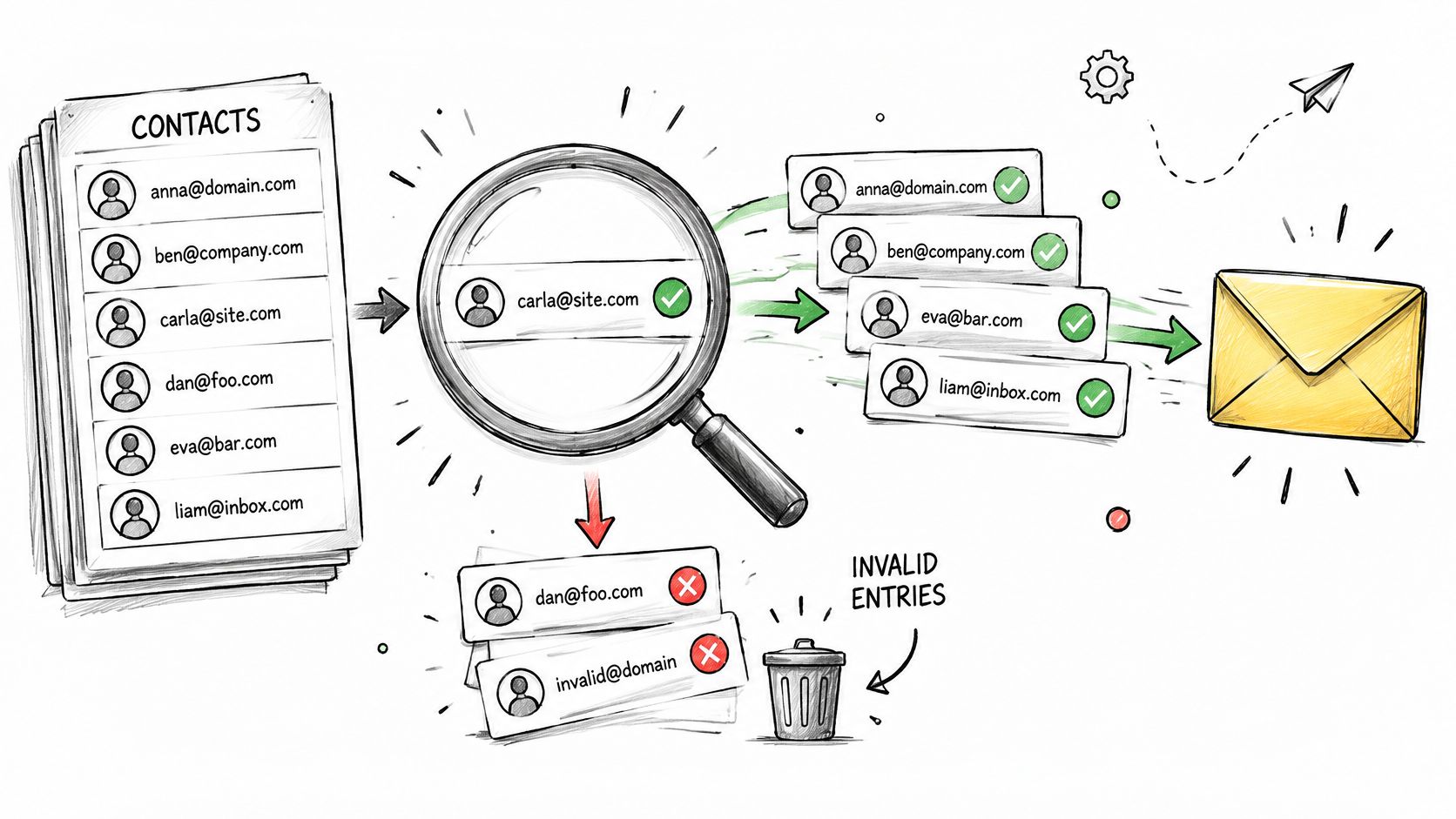
Sort every record into three groups before enrollment: verified, invalid, and uncertain. Scraping and enrichment produce all three in a single export. A staffing firm sourcing employer contacts will see clean addresses, hard failures, and catch-all domains where mailbox existence stays unconfirmed.
Reject invalid records, investigate uncertain ones, and hold catch-all addresses in a separate segment. A catch-all domain accepts mail sent to any address at that domain, so the record stays quarantined until role data or a reply confirms a real person behind it.
- Validate identity. Confirm that the person still works at the company and holds a relevant role.
- Separate uncertainty. Keep risky records out of the verified segment so their outcomes stay visible.
- Classify bounces. Distinguish permanent address failures from temporary deferrals before deciding what to suppress.
- Apply shared suppression. Block previously bounced or opted-out contacts before campaign enrollment.
A well-maintained lead generation list records qualification and provenance alongside names and addresses, which makes a deteriorating source easier to isolate.
Verification narrows the unknowns rather than erasing them. Its value is removing avoidable uncertainty before the sending domain pays for it through failed attempts and recipient complaints.
6. Cap daily volume per mailbox and spread sends across inboxes
Set each mailbox's daily cap below the provider limit, based on its own sending history. A mailbox may technically permit more messages than its placement record and recipient response justify. The provider ceiling is an account boundary, not an operating target.
A working cap for a warmed cold-email mailbox typically sits around 20 to 30 total sends a day, counting new outreach and automated follow-ups together. On a 25-send budget, that might mean 15 first-touch emails to new prospects and 10 slots held for scheduled follow-ups. Follow-ups draw from the same number, so a sequence can exceed its intended load even while new-prospect enrollment looks conservative.
Set capacity per mailbox, then constrain the domain and campaign around it. Spreading traffic across warmed inboxes improves operational control. It doesn't make aggressive targeting or excessive follow-up safe, and it shouldn't be used to evade provider restrictions.
Budget follow-ups before enrolling prospects
Before adding new contacts, count the follow-ups already due from each mailbox. On the 25-send budget above, three active sequences with follow-ups scheduled tomorrow can consume most of the allowance, leaving only a few slots for fresh enrollment. Without that reservation, yesterday's enrollment becomes tomorrow's unexpected volume spike.
- Set mailbox-specific limits. Base them on sending history, recent placement, deferrals, and recipient response.
- Keep domain-level controls. Multiple healthy-looking inboxes can still create an excessive combined load.
- Space activity. Avoid synchronized bursts from every mailbox at the same moment.
- Respect recipient hours. Schedule outreach around the prospect's local business day.
- Reduce after warnings. Don't compensate for a paused mailbox by flooding the remaining accounts.
More inboxes provide capacity only when the data, infrastructure, and recipient response justify using them.
A B2B lead generation strategy has to match enrollment to actual sending capacity rather than a desired prospect count. If the available infrastructure can't support the planned volume, reduce enrollment.
The trade-off is straightforward: conservative limits slow initial coverage but preserve room for replies, follow-ups, and troubleshooting. Running at maximum leaves no margin when a mailbox gets paused or placement slips.
7. Make unsubscribing one click and honor it within two days
Use immediate suppression as the operating standard, with completion within two days as a maximum internal service target. There's no benefit in leaving an uninterested recipient exposed to another scheduled follow-up.
For marketing outreach at scale, configure List-Unsubscribe and List-Unsubscribe-Post headers and include a visible body unsubscribe option. A body link alone isn't the same mechanism as the mail client's native one-click control.
Under the FTC's CAN-SPAM compliance guide, commercial-email opt-out mechanisms must remain operational for at least 30 days after sending, and requests must be honored within 10 business days. Those legal limits shouldn't become the program's preferred processing speed.
Suppress across the program, not just the sequence
Suppose a prospect unsubscribes from an agency's campaign. The sending system should record the request centrally, cancel queued follow-ups, and prevent another mailbox from enrolling the same address.
The same control should handle a plain-language removal reply. Requiring an additional form after someone has clearly opted out creates unnecessary friction.
- Test sent headers. Inspect an actual received message rather than relying on a platform settings screen.
- Test the endpoint. Confirm that the unsubscribe action records suppression without requiring account access.
- Sync the CRM. Prevent an opted-out record from being re-imported through enrichment or another campaign.
- Check queued sends. Confirm that suppression stops already scheduled messages, not just future enrollment.
An unsubscribe isn't a sales objection for another mailbox to overcome. It's a stop instruction.
Central suppression also needs an owner. When the CRM, sending platform, and prospect database disagree, the most restrictive contact status should govern campaign eligibility until the discrepancy is resolved.
8. Write plain, relevant, low-link emails and measure inbox placement, not only opens
For outbound sent from secondary domains and multiple mailboxes, keep the first email focused: one relevant business problem, a clear reason for contacting the prospect, and an easy reply. Use zero or one link in the first touch. Add more only when each destination helps the recipient assess the offer. Keep formatting simple, and omit attachments, image-heavy signatures, and unnecessary tracking.
Google's sender troubleshooting documentation says correctly configured senders typically achieve DKIM and DMARC success rates of 95% or higher. That figure measures authentication success. It does not show whether a message reaches the inbox or earns a response.
Test the actual sending path
Send test messages from the campaign's intended mailboxes to controlled accounts at Gmail, Outlook, and Yahoo. Keep the sending domain, mailbox, message, and test conditions consistent so placement changes are easier to diagnose.
Seed tests reveal placement at the tested accounts and providers. Compare them with campaign outcomes before changing the setup.
- Inspect placement. Record inbox or spam placement by receiving provider.
- Classify replies. Track interest, referrals, objections, and hostile responses separately.
- Review failures. Check authentication results, hard bounces, and temporary deferrals as distinct signals.
- Reduce tracking. Remove unnecessary pixels and redirect links when diagnosing weak placement.
Measurement principle: Track qualified replies and inbox placement. Opens are an unreliable proxy for whether a prospect read the message, and a reply from the wrong buyer does not qualify as an opportunity.
If placement tests remain clean but recipients reject the premise, revise the segment, offer, or copy before changing infrastructure. Adding domains will not make an irrelevant message more relevant.
What each deliverability practice prevents and where it applies
A sending stack can pass its technical checks and still fail at the campaign level. Use this checklist to locate the failure before changing domains, mailboxes, or message volume.
- Authentication: Check the sending domain's SPF, DKIM, and DMARC results. If a message fails, identify which record or sending service is responsible before launching.
- Domain separation: Confirm outbound mail leaves from dedicated domains and inboxes, not the domain used for essential business correspondence. A separate domain limits the reach of campaign reputation problems.
- Readiness: Treat setup completion and campaign readiness as different decisions. Hold traffic if authentication or placement is inconsistent; the setup process can take under 15 days, but that is not a universal warmup schedule.
- Complaints: Review complaints by campaign and recipient segment. A rise is a stop signal: pause the source, then examine targeting and message relevance before resuming.
- List quality: Check the list before the first send and remove invalid addresses, prior bounces, unsubscribes, and existing customers. A clean list does not make a poor-fit audience relevant.
- Mailbox pacing: Count follow-ups as well as first-touch messages when setting daily limits. Spread traffic across warmed inboxes, and reduce volume if delivery problems emerge.
- Opt-outs: Make the unsubscribe path easy to find and apply requests across the program. A mailbox that keeps sending to suppressed contacts can turn one campaign problem into a wider complaint problem.
- Message and measurement: Keep emails relevant and light on links. Compare placement, replies, bounces, and complaints; opens alone cannot show whether the campaign is reaching the right people.
Build the Sending Stack in Order, Then Watch the Numbers
A mailbox can pass authentication checks and still fail under campaign load. Treat each sending domain and mailbox as a unit with its own technical health, placement results, and response patterns. Verify the messages leaving the platform, not only the DNS records shown in a dashboard.
Ramp mailbox activity in stages. Delay campaign traffic when authentication or placement remains unstable, or when recipient records show unresolved quality problems. A completed setup does not establish that a mailbox is ready for its intended volume.
Make campaign expansion conditional
Before launch, confirm that the audience fits the offer and that suppression rules apply across the program. Set per-mailbox limits that count follow-ups as well as initial messages. Hold expansion when an existing segment shows a problem; adding prospects can increase the load without fixing its cause.
Use the weekly review to examine reply quality, seed-list placement, and mailbox deferrals. Compare placement across providers under consistent test conditions. If a mailbox receives deferrals on two consecutive attempts, pause that mailbox and investigate before sending again. Repeated deferrals can signal that the receiving server is rejecting the current sending pattern.
Daily exception handling still matters. A scheduled review should not leave a failing mailbox active until the next meeting.
Assign ownership before outsourcing
For founders considering managed outbound, clarify who maintains DNS, investigates failed sends, reviews prospect data, pauses risky segments, and keeps suppressed contacts out of future campaigns. These tasks need named ownership, whether handled in-house or by a service provider.
The first step with IronPeak Marketing is a free strategy session to assess the company's current situation, offer, target market, and growth goals. That assessment determines whether its cold email system fits before infrastructure is built.
Expand only when the system is holding up. Consistent placement, relevant replies, and reliable mailbox behavior give operators a basis for increasing activity, rather than relying on a launch date or available inbox capacity.
IronPeak Marketing offers managed B2B cold email outreach with dedicated sending infrastructure, prospect data collection, and daily inbox management. Visit IronPeak Marketing to book a free strategy session and assess the offer, target market, and infrastructure needed before campaigns go live.