Cold Email Tips: 8 Ways to Protect Inbox Placement
Cold email tips from an operator's view: authentication, domain warming, volume caps, list hygiene, copy and follow-up sequences that reach the inbox.
Cold email performance depends on the entire sending operation. A 2019 analysis of 12 million outreach emails found that only 8.5% received any response. The figure puts the challenge in view, but response rates depend on more than wording. Authentication, inbox setup, send volume, list quality, sourcing, copy, follow-ups, and measurement all affect whether a campaign reaches the right buyer and earns a reply.
These cold email tips are for B2B founders and high-ticket service providers building outbound as an operating system. Each layer addresses a different failure point: authentication protects domain trust, volume controls limit sending risk, list hygiene reduces bounces, and offer-specific messaging gives prospects a clear reason to respond. The trade-off is operational effort. Better controls take setup and ongoing attention, but they make campaign results easier to interpret.
Copy is the last layer in the stack. Start with the infrastructure.
1. Authenticate every sending domain with SPF, DKIM, and DMARC before the first send
Mailbox providers decide placement largely on whether a sending domain can prove it authorized a message. SPF lists which servers may send for the domain. DKIM signs each message with a key published in DNS. DMARC tells receivers what to do when authentication fails and returns aggregate reports to the domain owner.
The requirement is not optional at scale. Since February 1, 2024, all senders to Gmail accounts must use at least SPF or DKIM, and bulk senders must implement all three, as set out in Google's email sender guidelines. Google defines bulk senders as those sending at least 5,000 messages per day to Gmail accounts, and those senders need authentication aligned to the visible From domain, per Google's bulk sender requirements.
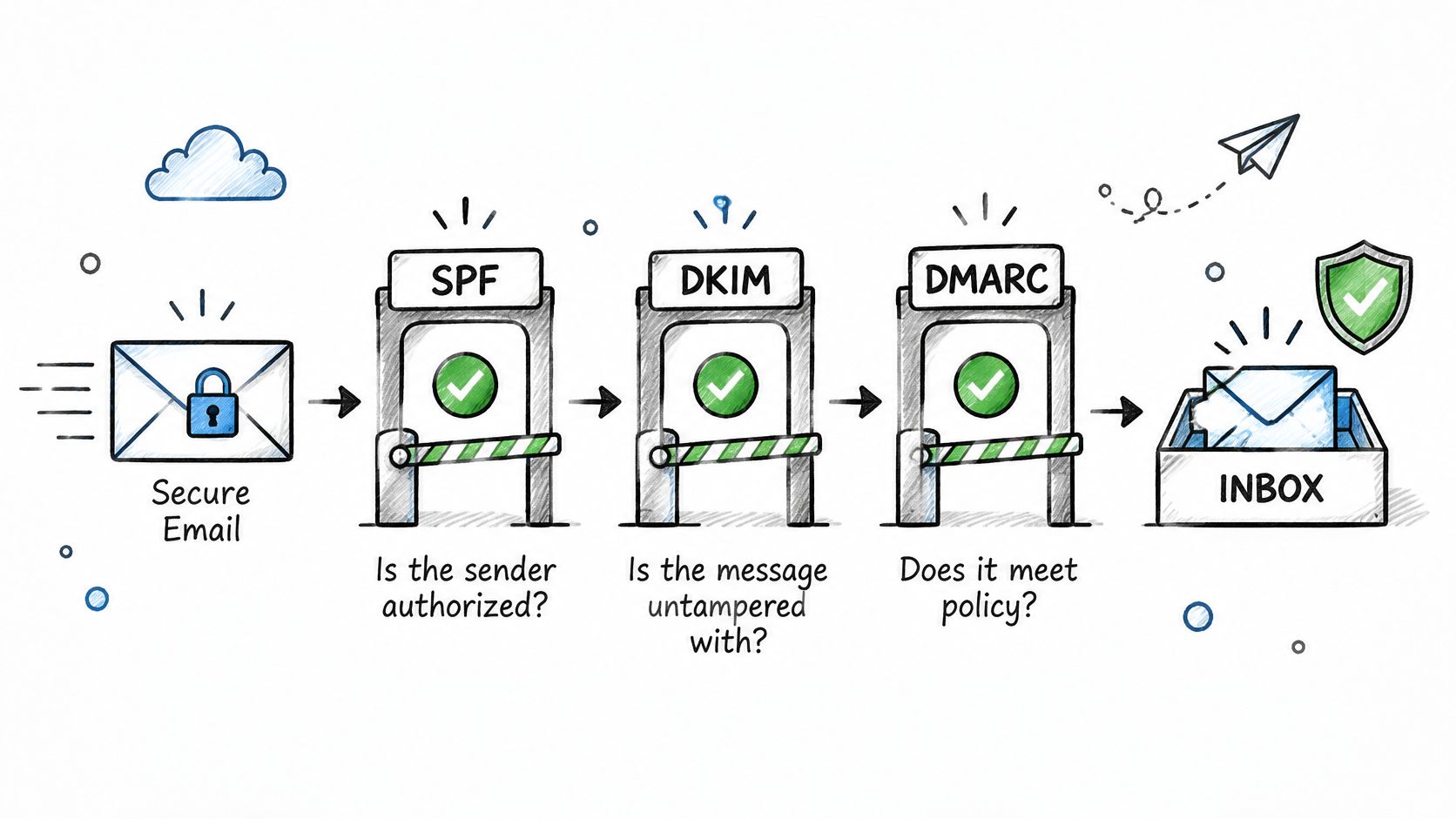
A Worked Setup
Say a recruiting firm gets two outreach domains. Each receives its own SPF record with the correct include for the sending tool, a 2048-bit DKIM key per tool, and a DMARC record at p=none during initial monitoring. After aggregate reports show no unexplained failures, the policy moves to p=quarantine. The custom tracking domain resolves on a subdomain the operator controls, so tracking reputation stays separate too.
- Verify every record after publishing: A missing include or a second SPF record produces a permerror and SPF fails outright.
- Keep the primary domain out of cold sending: A complaint spike then can't damage invoices, transactional mail, or the main brand domain.
- Add the correct unsubscribe header: Yahoo requires the List-Unsubscribe header, preferably RFC 8058, for promotional mail, according to Yahoo's sender FAQs.
- Review DMARC reports weekly during warm-up: Unexplained failures surface there before they become placement problems.
Practical rule: Authentication doesn't make unsolicited email welcome. It only removes a technical failure that blocks relevance from ever being judged.
2. Use dedicated domains and inboxes, then warm them on a fixed ramp
Sending cold email from a primary company domain puts the whole brand at risk. One campaign with a complaint spike or bounce surge drags down sender reputation, and that reputation follows every other message the domain sends. The standard fix is structural. Operators register several look-alike domains close to the brand, create a small number of mailboxes on each, and warm those mailboxes before real campaigns begin.
Warm-up means low volumes between controlled accounts, with opens, replies, and messages rescued from spam so receiving providers observe normal engagement. IronPeak Marketing describes an initial setup period of about 15 days covering domain provisioning, authentication, tracking, and warm-up before campaigns operate. That timeline is a useful planning benchmark because it forces volume math early rather than at launch.

Consider the arithmetic. Three domains with two mailboxes each produce six inboxes. At 20 new prospects per inbox per day, capacity reaches 120 sends daily before follow-ups. Across 45 active sending days, that's roughly 5,400 first touches. A founder expecting double that volume needs more domains warmed in advance, not higher caps forced onto the same six inboxes mid-quarter.
Ramp Discipline That Holds
- Increase by a fixed daily increment: Adding a small number of messages per day works better than jumping straight to a target cap.
- Keep warm-up running during campaigns: Warm-up isn't only a setup phase. Ongoing engagement helps active inboxes maintain a normal sending pattern.
- Use business-appropriate mailbox names: The sender name is the first trust signal a recipient sees, before the subject line gets read.
- Provision a replacement domain early: A standby domain warmed in advance prevents a stalled campaign when an active domain degrades.
The trade-off is patience. Warm-up delays launch, but skipping it trades a two-week wait for a burned domain and a restart from zero.
3. Cap volume per inbox and throttle sends to human-looking patterns
Sending rate matters as much as copy. Receiving servers track how quickly each mailbox sends, how messages are spaced, and whether recipients report spam. Set a daily cap per inbox, schedule sends around recipients' business hours, and vary the intervals so each mailbox does not repeat the same pattern.
Google recommends keeping the user-reported spam rate below 0.1% and preventing it from reaching 0.3% or higher, according to Google's spam rate guidance for bulk senders. At 5,000 messages per day, the 0.1% target means fewer than roughly five complaints daily. If complaints rise, adding inboxes or revising copy will not fix the underlying problem: recipients are marking the messages as spam.
A construction services campaign targeting commercial property managers across three time zones can schedule each mailbox for recipients' local morning hours, with a cap of 25 new prospects per inbox per day. Stagger sends across the list rather than releasing them all at once. Increase capacity by adding warmed inboxes and raising caps on different inboxes on different days.
Controls Worth Running Daily
- Track health per mailbox: Campaign averages can hide an inbox that is starting to fail.
- Pause after a bounce spike: Give the mailbox time to recover while you examine the cause.
- Separate complaints from bounces: Bounces indicate an address or list-quality problem. Complaints point to targeting or relevance.
- Review placement by domain: Seed tests and per-domain reporting help locate delivery problems. Follow email deliverability best practices when setting up that review.
Set volume from inbox health. A default cap copied from a template cannot account for how each mailbox is performing.
4. Verify every address before it enters a sequence and remove risky addresses
An enriched list of 2,000 scraped addresses should be verified before launch. Verification checks syntax, domain validity, mailbox existence and risk signals such as role accounts, disposable domains and catch-all servers. Remove invalid addresses before they reach a sequence.
Treat catch-all addresses separately. A catch-all server accepts mail for any local part, so a verification tool cannot confirm whether an individual mailbox exists. Mixing these addresses with confirmed mailboxes obscures the source of bounces. Put them in a separate, lower-volume sequence and track their results apart from the verified segment.
Hygiene Rules That Prevent Self-Inflicted Damage
- Pause when bounce rate climbs: A rising rate can point to list decay or a poor source. Continuing to send makes the problem harder to isolate.
- Re-verify aged lists: People change roles and mailboxes close, so check lists again if they have been sitting for weeks.
- Keep hard bounces suppressed: Do not re-add an address after a hard bounce, even if its format appears correct.
- Use one suppression list across campaigns: Apply each opt-out everywhere, promptly.
- Honor opt-outs: The FTC requires senders to honor opt-outs within 10 business days and keep the opt-out mechanism working for at least 30 days, according to its CAN-SPAM compliance guide.
Verification costs money per address and reduces the usable list. That trade protects the sending domain: fewer risky addresses mean fewer avoidable bounces and a clearer read on list quality.
5. Source prospects beyond saturated databases using signals and custom enrichment
A prospect list becomes more useful when each record includes a reason to contact that person now. Job postings, recent funding, new locations, hiring surges, licensing changes, and technology adoption can signal a current need when they connect directly to the offer.
A staffing firm defines its ideal client as a company with three or more open roles in a single trade, posted for at least 30 days. The operator gathers relevant postings, matches companies to decision-makers in operations or HR, then enriches each record with headcount and location. AI agents can classify and score records against the ideal customer profile. The criteria should reflect the types of companies that have become customers, rather than broad assumptions. This is the foundation of effective B2B sales prospecting.
Custom data collection can also help reach prospects who receive few cold emails. IronPeak Marketing uses custom API keys and AI agents to scrape data and identify those prospects. A signal still needs a clear link to the problem being sold; a recent event alone does not make a company a qualified lead.
- Test the signal on a small sample first: A few hundred records can show whether a trigger helps identify relevant prospects before a larger build.
- Write disqualifying criteria explicitly: Define exclusions alongside inclusions so enrichment can filter out poor fits.
- Record the source and date for each signal: Stale information can make outreach irrelevant. An audit trail shows why each prospect was selected.
- Segment by role relevance: Contact people who plausibly own the problem, and account for applicable compliance and relevance requirements in your targeting.
6. Write offer-specific, plain-text copy with a single low-friction call to action
Cold email copy works when it makes a specific claim about a specific buyer. It fails when it describes the sender's company. The first email should stay short, usually under 100 words, written as plain text with no images, minimal formatting, and at most one link. One likely problem, one concrete outcome, and one question answerable in a short reply. Nothing else earns its place.
Templates only work as starting structures. Copy for a home services operator, a software founder, and a recruiting firm must differ because the buyer's problem, vocabulary, and cost of inaction differ. Trade language matters especially in construction and healthcare, where generic SaaS phrasing reads as outsider copy within two lines.
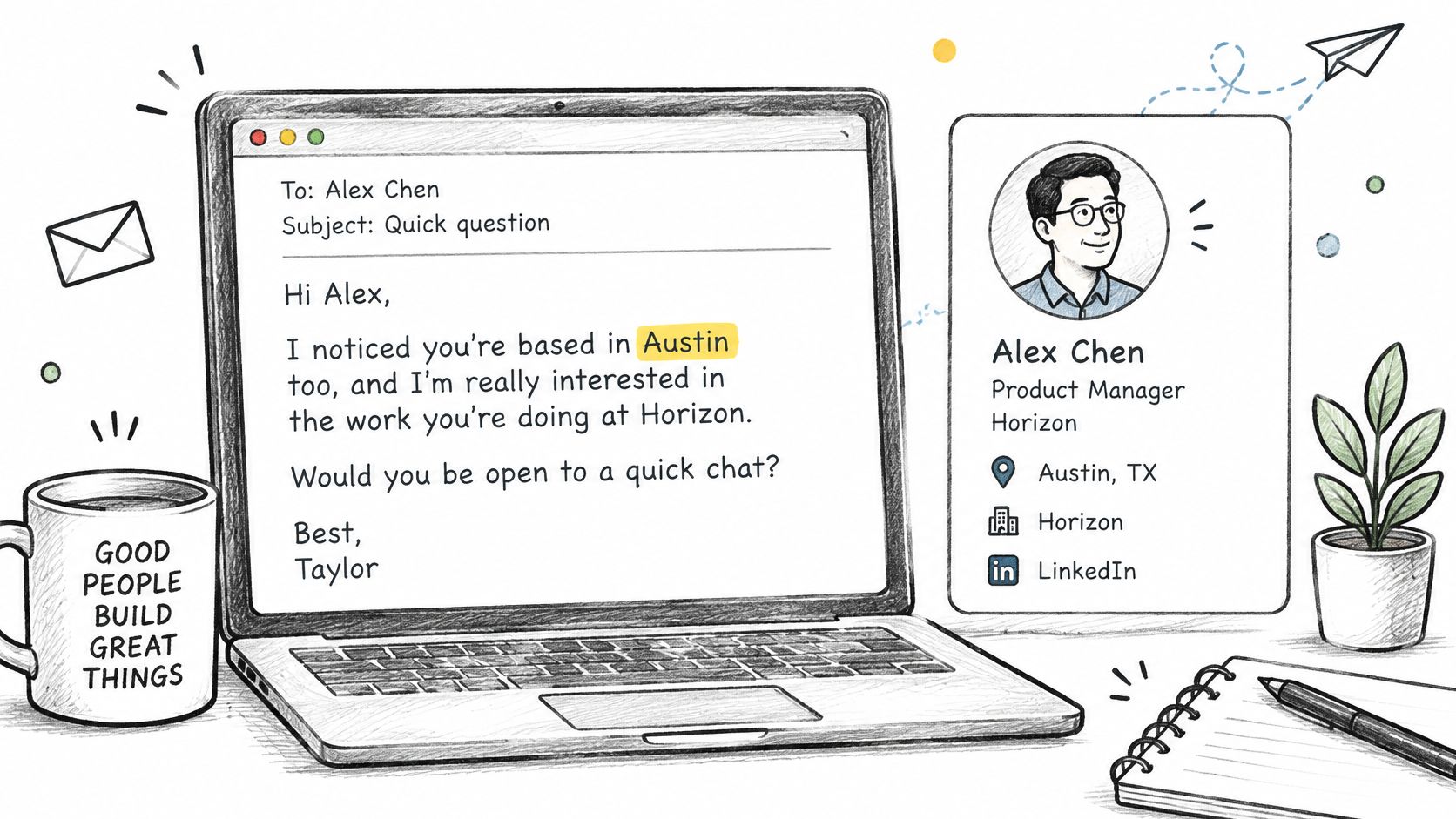
An electrical services example aimed at property managers shows the shape:
Saw the portfolio took on two new buildings on the north side this quarter. Is there a standing electrician for turnaround work, or is that still bid by bid?
The personalization is verifiable from public listings. The question takes one line to answer. There's no pitch deck, no calendar link, and no claim the operator can't defend.
- Verify every personalization line: Any claim that can't be confirmed from a public source gets removed before sending.
- Skip links and attachments in the first email: Both raise filtering risk before trust exists.
- Test one variable at a time: Change the opening line or the question, keep a control, and let replies decide.
- Read the email aloud: Sentences that sound like a brochure get rewritten as sentences a peer would send.
Personalization has a ceiling. It can't compensate for weak market fit or a problem the buyer doesn't feel. When relevant, well-targeted copy still fails, the offer or the segment is the next thing to question.
7. Design follow-up sequences that stop on reply and respect timing
A follow-up sequence needs a clear reason for each message and a firm stop rule. Three to five touches over one to three weeks gives prospects room to respond without stacking messages in the same week. Leave two to four business days between touches, and add a new angle, useful observation, or simple way to decline each time. Repeating the original pitch adds no value.
A marketing agency builds four touches. Touch one asks about client reporting. Touch two notes a relevant detail from the prospect's published case studies. Touch three asks whether a brief call would be useful. Touch four closes the loop politely. For ideas on structuring each message, use these B2B sales email templates as a starting point, then adapt the wording to the segment. Stop the sequence as soon as the prospect replies.
Required Stop Conditions
- Reply received: Stop automation and assign a named human owner to respond promptly.
- Unsubscribe or objection: Add the address to suppression across all campaigns before another message is scheduled.
- Hard bounce: Remove the address from the sequence and future sends.
- Poor-fit classification: Record the reason for the mismatch so the segment or targeting can be reviewed.
Review unsubscribe and complaint messages regularly. If recipients object to the same claim or touch, rewrite or remove it.
8. Define qualified lead criteria up front and measure outbound through to meetings
A B2B software founder defines a qualified lead as a VP or director in operations at a company with at least 50 employees, a pain point the product addresses, and a decision timeline within 90 days. A lead missing two of those criteria is rejected, and the reason is logged for the next targeting review.
Set qualification rules before launch and get written approval from the person who will take the calls. Include role, company size, budget range, timing, and current solution. If payment depends on qualified leads, the criteria also determine which leads can be rejected without payment.
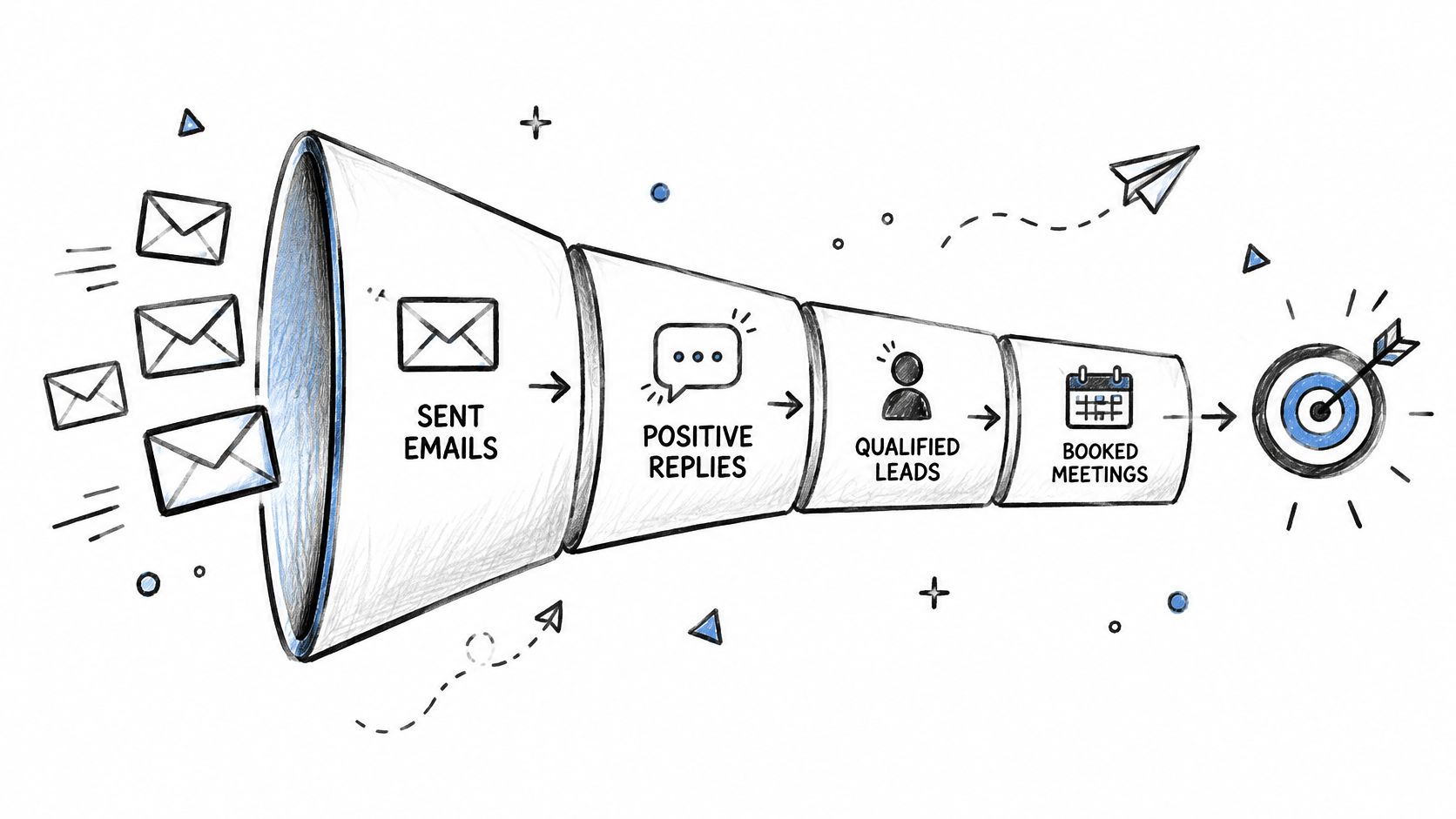
A reply alone does not show whether a campaign is producing pipeline. Track delivered emails, replies, positive replies, qualified leads, and booked meetings separately. Each stage helps locate the bottleneck: weak delivery, low engagement, poor fit, or difficulty converting interest into a meeting.
- Compare cohorts: Review results by ideal customer profile, offer, domain, and sequence step to identify which segments are producing qualified leads.
- Connect outcomes in the CRM: Pass lead and meeting details into the CRM, then feed closed revenue back into sourcing criteria so they reflect buyers who purchase.
- Set a measurement window: Use a consistent campaign window to compare results, and track longer sales cycles separately.
A steady feedback loop matters more than a one-time list review. Log why leads are rejected and use those reasons to adjust targeting. Measure the full path from delivery to booked meeting, then use sales outcomes to refine who enters the next campaign.
The 8 cold email tips at a glance
Use this table as an operating checklist: the trigger tells you when to act, and the check gives you a concrete signal to review.
| Tip | Area | When to act | Practical check |
|---|---|---|---|
| Authenticate every sending domain with SPF, DKIM, and DMARC before the first send | Authentication | Before sending from each domain | Confirm SPF and DKIM pass, then review DMARC reports for alignment failures |
| Use dedicated domains and inboxes, then warm them on a fixed ramp | Infrastructure | Before launch and during active campaigns | Track inbox placement and reputation by mailbox |
| Cap volume per inbox and throttle sends to human-looking patterns | Sending volume | During every campaign | Review bounce and complaint rates by mailbox; pause a mailbox if either rises |
| Verify every address before it enters a sequence and remove risky addresses | List hygiene | Before a contact enters a sequence | Check bounce rate after each send batch and investigate increases before sending again |
| Source prospects beyond saturated databases using signals and custom enrichment | Prospect sourcing | During targeting and list building | Compare reply rates by source and buying signal |
| Write offer-specific, plain-text copy with a single low-friction call to action | Copy | Before launch and during message tests | Compare positive reply rates across versions |
| Design follow-up sequences that stop on reply and respect timing | Follow-up strategy | When building sequences and processing replies | Confirm replies stop the sequence; monitor unsubscribes and complaints |
| Define qualified lead criteria up front and measure outbound through to meetings | Measurement | Before launch and throughout reporting | Track qualified leads and booked meetings separately |
Putting the Stack Together and a Practical Path to Booked Meetings
A cold email system needs an owner, a schedule, and a feedback loop. Without them, a technically sound setup can still produce weak pipeline: poor-fit prospects enter the sequence, replies sit unanswered, or sales rejects leads without changing the targeting.
A practical first month starts with decisions, not volume. Before launch, agree on what qualifies as a lead, which prospects fit the offer, and how sales will record outcomes. During setup, prepare the domains, inboxes, prospect data, copy, and tracking. Once campaigns are live, review replies and booked meetings regularly, then adjust targeting or messaging when the results show a clear mismatch.
Keep the handoff tight. Inbox management should classify responses and stop follow-ups when a prospect replies. Sales should record whether each handoff meets the agreed criteria and whether a meeting was booked. That feedback connects campaign activity to pipeline instead of treating opens or replies as the final result.
For a business running outbound in-house, this requires consistent ownership across infrastructure, data, inbox handling, and sales reporting. IronPeak Marketing offers a managed alternative, with custom domains, dedicated inboxes, copywriting, enrichment, tracking, and follow-ups; its headline offer is 60–90 qualified leads in 45 days on a pay-per-result basis.
Founders and service providers who want booked meetings without hiring an internal outbound team can start with a free strategy session at IronPeak Marketing.