Prospect Lists: What They Contain and How to Use Them
Prospect lists explained: the fields they need, where records come from, how fast they decay, and how to qualify and send to them responsibly.
Commercial email lands in the inbox 86.0% of the time, in spam 4.8% of the time, and never arrives at all 9.2% of the time, according to Validity's 2025 benchmark report. Roughly one send in eleven is gone before a buyer can open it, and the same report notes that B2B deliverability is the harder case because the way lists get acquired often produces less engaged recipients.
That single number reframes the whole topic. A prospect list isn't a spreadsheet of names you buy once. It's a governed, time-sensitive dataset, and its quality shows up in exactly two places: whether the message reaches the inbox, and whether the person reading it can approve the purchase.
Judged that way, most lists fail on mechanics long before they fail on copy. Record counts climb, reply rates slide, domains get throttled, and the campaign takes the blame for a data problem. The repair starts with the fields, not the sequence.
The Fields a Working Prospect List Needs
A prospect list is a set of named buyers plus the attributes that decide who gets contacted, in what order, and with which message. That's a higher bar than most purchased lists clear. A contact file holds names and addresses. A prospect list holds the fields that let you rank an account, segment a market, and defend the decision to email one person and skip another.
The fields that carry the decision
Eight fields do most of the work, and each has a specific way of going wrong:
| Field | What It Decides | Example | Failure Mode |
|---|---|---|---|
| Job title and function | Whether the person holds buying authority | VP Operations | Title says VP but function is finance |
| Seniority | Whether the contact can approve spend | Director | Coordinators mixed into the list |
| Company domain | Identity match to the account | acme-hvac.com | Two accounts share one company name |
| Geography | Territory and time-zone fit | Columbus, OH site | Head office used instead of the working site |
| Headcount band | Account size fit | 25-50 employees | Stale after a hiring or layoff round |
| Verified work email | Whether the message can be delivered | j.smith@acme-hvac.com | Invalid or catch-all domain |
| Last verified date | Whether the other fields still hold | Verified 14 May 2025 | Missing, so the age of every field is unknown |
| Source and capture date | Auditability of each record | Provider export, 4 Mar 2025 | Provenance unknown |
Geography is the field that breaks segmentation. A list that captures head office puts a Columbus buyer in a New York sales territory and the wrong time zone for a call. Headcount bands rot within a quarter at any company that hires or cuts in cycles, so an account that fit a 25-50 filter at pull time can be a 200-person business by launch. The email field fails in two directions: an address that never resolves, and a catch-all domain that accepts every message and delivers to no one.
Two fields make the rest auditable. Last verified date tells you whether the other seven still hold. Source and capture date tells you who to hold accountable when they don't.
Decision context belongs in the list
Names and addresses don't tell a rep why the person is worth an email. Research does. LinkedIn's 2022 State of Sales report found that 82% of top-performing sellers research prospects before contacting them, against 49% of other sellers, and reported an 86% uplift in InMail response when the seller had viewed the buyer's profile beforehand.
So add fields for role seniority, business model, likely need, the recent change that makes now the right moment, and one defensible sentence on why the offer fits. That layer also has to be refreshed, because the buyer keeps changing. A survey of more than 400 senior B2B decision-makers summarized by Sales & Marketing found that 71% of B2B buyers were millennials or members of Generation Z in 2025, which means persona assumptions written three years ago describe a different person.
Run this test before the next campaign. Pull ten random rows, check every field against the company's own website and the person's own profile, and count how many hold. That count is the first honest measure of list quality, and it costs twenty minutes.
Where Prospect Records Come From and What Each Source Gets Wrong
Where a list comes from sets both its reach and the risk you inherit with it. Two lists of identical size can behave nothing alike in a campaign, because one was assembled from records every competitor in the niche can also buy, and the other was built from a narrow signal almost nobody watches. The sourcing decision is a strategy decision, not an administrative one.
The shared-database problem is saturation. Licensed providers give wide coverage and fast pulls, which is useful for a first pass. The catch is that the same records go to every seller buying in that segment, so a tightly defined market produces the same 400 contacts in every competitor's sequence on the same Tuesday. Reply rates fall, complaint rates rise, and the copy gets blamed.
Comparing the sources on reach, risk, and purpose
| Source | Main Strength | Main Weakness | Best Use |
|---|---|---|---|
| Licensed contact database | Wide coverage and fast pulls | Shared with many sellers, fields go stale | Broad first pass on a defined market |
| Past CRM records | Known history and past outcomes | Often lapsed and small | Re-engagement segments |
| Public signals (job postings, funding, press) | Shows timing and need | Names no verified buyer | Trigger-based prioritization |
| Custom scraping and API enrichment | Reaches accounts outside shared databases | Needs maintenance and compliance review | Narrow or saturated markets |
| Referrals and inbound | High intent from the start | Volume is unpredictable | Warm sequence source |
Public signals are the most misunderstood of these. A hiring post for three field engineers tells you a project is funded. A funding announcement tells you budget exists. Neither names the person who signs, so a signal on its own is a timing flag, not a contact. It has to be paired with a contact layer before it goes into a sequence, and the window is short because buying moves fast. TrustRadius's 2024 B2B Buying Disconnect research found that 87% of B2B buyers complete their purchase within six months, per Cirrus Insight's summary of the data.
Custom enrichment is where narrow markets get solved. Building records from primary sources reaches accounts that never appear in a shared database, which matters when the total addressable market is 900 companies. It also carries an engineering and compliance cost that has to be staffed. The workable mix is usually a broad first pass from a database, prioritization from public triggers, and custom enrichment for the accounts that carry most of the revenue, which is the same layering covered in these prospect research tools.
One question sorts providers faster than any demo. For a given record, where did it come from, when was it captured, and when was it last verified? A provider that can't answer all three is selling a list of unknown age.
What to Require From a List Provider
Get the answers in writing before any volume purchase, because these terms decide whether a bad batch is your problem or the provider's:
- Source disclosure. The contract names where each sold field was captured, and when, so a bad segment can be traced rather than argued about.
- Verification rights. Ask how often records are re-verified and what happens to the ones that fail. "Continuously updated" is a marketing line. A stated interval with a stated action is a term.
- Replacement terms. Bounced and invalid records should be replaced or credited inside a stated window, with the definition of "invalid" agreed before the invoice, not after.
- Resale exposure. Ask directly whether the same records are sold to other sellers in your market. If they are, plan for saturation and expect lower reply rates on that segment.
- Suppression pass-through. The provider has to accept your opt-out list and remove those contacts from future deliveries, so a suppressed person is not reloaded next quarter.
- Sample access. Request 50 rows from the exact segment you intend to buy and check them against company websites and public profiles. A sample that fails the check is the cheapest rejection you'll ever make.
Record those terms next to each purchase. When qualification later reports a defect rate, the contract is the reference point that turns a complaint into a fix.
Why Records Decay and How Fast
B2B contact data decays at roughly 2.1% per month, which compounds to about 22.5% over a year, according to a widely cited benchmark on CRM data decay. Run that against a 10,000-record list with no maintenance and roughly 2,250 records go bad inside twelve months: wrong title, wrong employer, dead mailbox, or a person who no longer owns the budget. You're left defending about 7,750.
The drivers map onto qualification fields, which is why the damage is worse than a generic housekeeping number suggests. A job change rewrites the title field. An employer change rewrites the domain. An invalid work address or a disconnected direct line breaks the only route you had to the person. A company closure removes the account, and a shift in buying responsibility removes the authority, sometimes with nothing visible changing in the record.
Practical rule: schedule re-verification before a campaign launches, not after a bounce spike proves the list has aged.
Measure the rate instead of assuming it
Treat 22.5% as a benchmark, not a constant. Technology, staffing, and marketing turn over faster than utilities or manufacturing, and seniority matters too, since executives move more often than individual contributors in stable functions. Your own number is the one worth planning around.
Re-verify a fixed sample of 200 records every quarter and record the failure rate by segment. Note which fields failed, not just how many rows did. If title fails at 9% a quarter in one segment and email fails at 4%, the title field needs a shorter re-check interval than the email field, and the sequence should be built to tolerate a stale title while never tolerating a stale address. Set the re-verification interval from that measured rate, and rerun the sample when the segment or the offer changes.
Why Accurate Records Still Reach the Wrong Buyer
The image below shows one person appearing in two lists, with two different titles and two employers. Both rows look complete and deliverable. At most one of them is right.
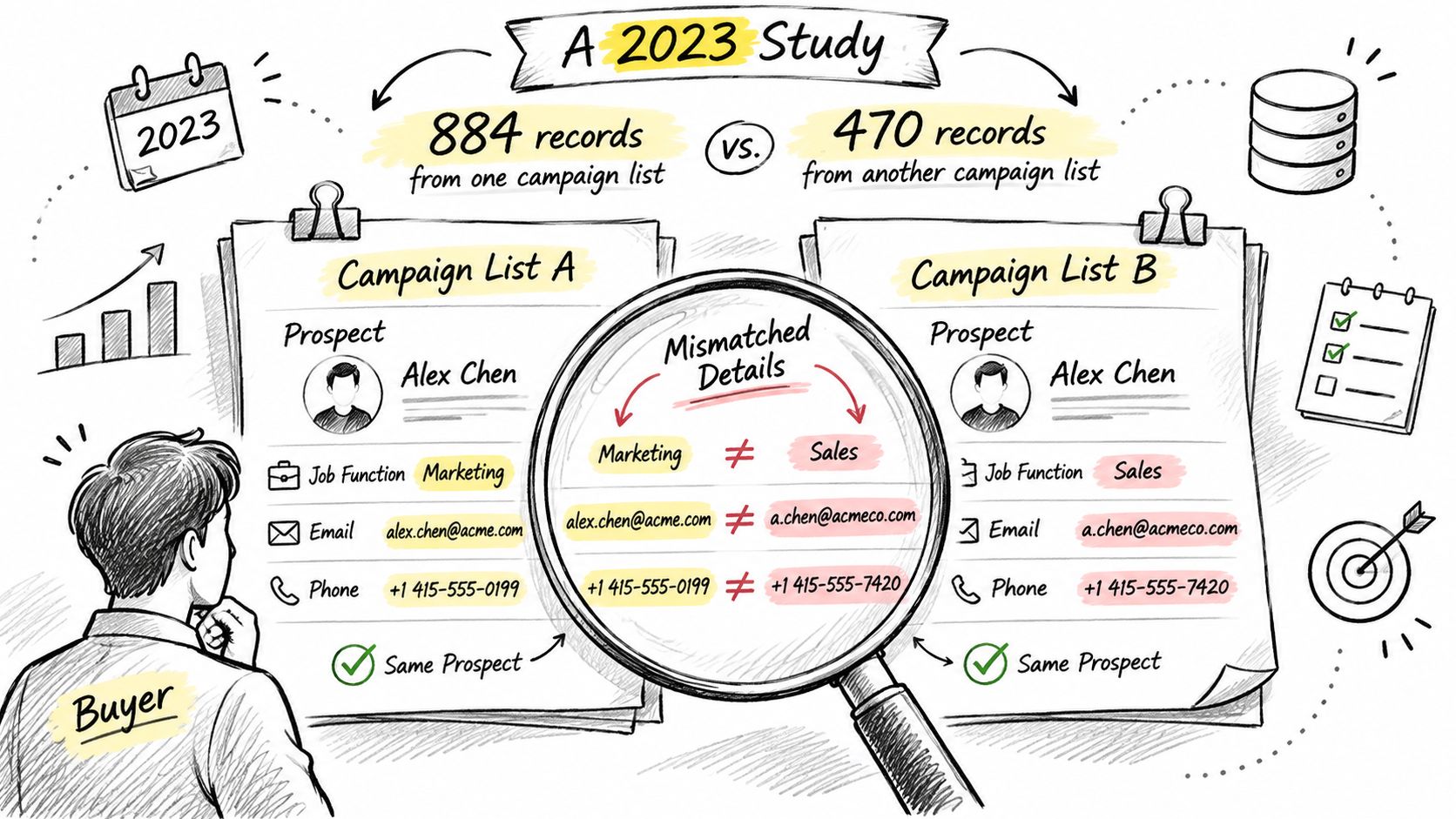
A 2023 peer-reviewed study tested how well campaign lists identify IT decision-makers. Researchers sampled 884 people from one commercial provider's lists and 470 from another, then compared the listed profiles against independently measured characteristics. Job function and location were wrong for a majority of people in the sampled lists. The average match rate for likely IT decision-makers was only 16.3% to 17%, against an independently measured 16.1% to 18.2% share of IT decision-makers in the relevant population, as detailed in this summary of the study.
Read that gap carefully. The lists performed close to a random draw. A record can be present, complete, technically deliverable, and still assign the wrong role or the wrong market segment, which is why reply rates on a "perfectly built" list can look like noise.
There are two separate failure points, and both need checking. The first is the accuracy of the profile itself: is this person really a VP of Operations at this company? The second is the accuracy of matching that profile to the identifier you send to, because a correct profile attached to the wrong mailbox or the wrong person's address reaches someone else entirely.
A correct title is not a buying group
Mapping one contact per account assumes a purchase that doesn't exist anymore. Demandbase's State of B2B Buyer report found that 72% of B2B purchases involve complex, multi-stakeholder buying groups, and that 56% of B2B buyers believe vendors poorly understand their business needs, per the State of B2B Buyer report. One title on one row doesn't tell you who signs.
Map each account to the roles the offer touches: the economic buyer who releases budget, the technical evaluator who can veto on integration, the user who lives with the outcome, procurement, and any blocker with a reason to keep the status quo. Record the business problem each role cares about, and add contacts only when they hold a distinct role. Adding the whole department produces generic copy aimed at five different priorities.
Gate before scaling: validate role and location on a sample, publish the role match rate, and don't increase volume on a segment until that rate is known.
How to Qualify Records Before They Enter a Sequence
Qualification is the gate between a data pull and a live sequence. Records that fail here never receive a message, which is far cheaper than discovering the problem through complaints, bounces, and a throttled domain. The dimensions worth measuring are completeness, validity, accuracy, timeliness, uniqueness, and consistency, the framework set out in this data quality monitoring guide. Each one converts into an operating control rather than a vibe.
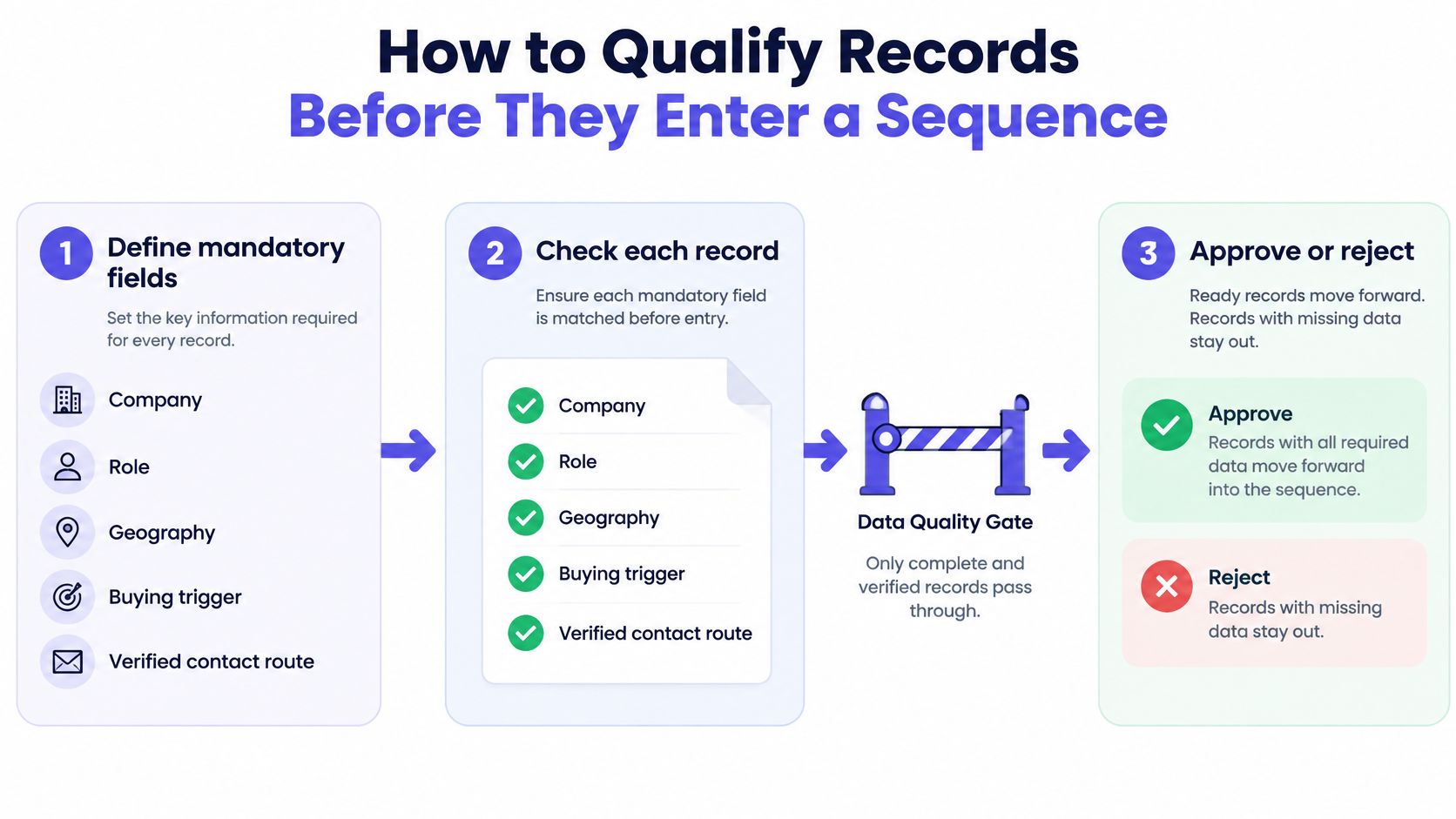
The flow below is the short version: mandatory fields defined first, every record checked against them, then a clean approve-or-reject decision before anything is enrolled.
The seven checks, in order
- Define the mandatory fields for the segment. Company, role, geography, buying trigger, and a verified contact route. A record missing any one of them can't be scored, so it can't be prioritized, and a list of unscorable rows is a list of guesses.
- Resolve identity before counting anything. Match on company domain and legal name so duplicate accounts and duplicate contacts merge. A 12,000-row list that resolves to 8,400 unique contacts is a different campaign with a different reply rate.
- Test completeness and validity. Required fields populated, values inside permitted ranges, email syntax correct. This check is mechanical and should run automatically, because humans skip it under deadline.
- Sample against the source of truth. Take 50 rows per segment and check them against the company's own site, its leadership page, and the person's public profile. Record the accuracy rate. Fifty rows tells you more about a segment than any provider deck.
- Set freshness limits for volatile fields. Title, headcount, funding, and technology use all move. Any record older than the limit goes back for re-check rather than into the sequence.
- Quarantine the failures with a reason code. Failed identity, missing mandatory field, stale beyond limit, suppressed. The reason code is what lets you tell a data problem from an offer problem three weeks later.
- Report yield, not volume. Defect rate, usable-record yield, and accepted-lead conversion per segment. Raw record counts hide all three, and a segment that yields 300 usable records with a high acceptance rate beats 3,000 rows that convert nobody.
The order matters for one reason. Enrichment and qualification run before copy generation and enrollment, so a failing record never gets a message written for it. Reverse the order and the copy gets tuned to a person who doesn't exist in that role.
A segment that passes looks unremarkable: a low duplicate rate, a sample accuracy rate agreed in advance and met, and a quarantine queue that shrinks each cycle instead of growing.
Sender Reputation and Compliance Limits on Using Lists
A list is only as usable as the domain sending to it. Deliverability rules now cap what a weak list can do regardless of how good the copy is, and the ceilings are published. Start with Gmail, per Google's sender guidelines for bulk senders.
Senders must keep user-reported spam rates below 0.3%, and Gmail recommends staying below 0.1% instead of operating near the enforcement limit. Bulk senders need SPF, DKIM, and DMARC authentication, while all senders must use at least SPF or DKIM. Gmail also requires valid forward and reverse DNS records, including PTR records, for sending domains or IP addresses.
Outlook adds a volume threshold
Microsoft sets a separate bar for high-volume senders. Domains sending more than 5,000 messages per day must pass SPF and DKIM and publish DMARC with at least a p=none policy aligned with SPF or DKIM, as described in Microsoft's guidance for high-volume senders. Noncompliant messages may first route to Junk and may be rejected outright if the problem continues.
The threshold applies to the sending domain's aggregate volume, so splitting sends across more inboxes doesn't remove the requirement. Operators who add inboxes to scale should verify domain authentication before raising daily sends, not after.
CAN-SPAM sets the suppression clock
United States law adds its own mechanics. Under the FTC's CAN-SPAM compliance guide, commercial messages must avoid false or misleading header information and must include a clear, conspicuous opt-out. That opt-out has to remain able to process requests for at least 30 days after a message is sent, and any request must be honored within 10 business days.
| Rule | Threshold | What to Verify |
|---|---|---|
| Gmail spam complaints | Below 0.3% enforced, below 0.1% recommended | Complaint rate in Gmail Postmaster Tools |
| Gmail authentication | SPF or DKIM for all senders, SPF, DKIM and DMARC for bulk senders | Records published for every sending domain |
| Outlook high-volume senders | More than 5,000 messages per day from one domain | SPF, DKIM and DMARC at p=none or stricter, aligned |
| CAN-SPAM opt-outs | Processable for at least 30 days, honored within 10 business days | One central suppression list linked to every sequence |
That last row is where list management and legal exposure meet. An opt-out has to stop scheduled follow-ups, block the address from entering another campaign, and reach any party sending on the company's behalf. A suppression list held by an outsourced vendor that never syncs back is not a suppression list.
A strong reply rate doesn't offset a high complaint rate. Complaints are counted by mailbox providers whether the recipient replied or not, and enough of them reduce delivery on everything else the domain sends.
Treat list hygiene as infrastructure, not targeting. Track complaints in Gmail Postmaster Tools next to accepted-lead conversion, and when complaints climb while conversion drops, stop sending and fix the data. The mechanics of that check sit in these email deliverability best practices.
Confirm the List Before Your First Send
Nothing enters a campaign until every gate passes. Set the list next to the checklist below and answer each line with evidence rather than opinion.
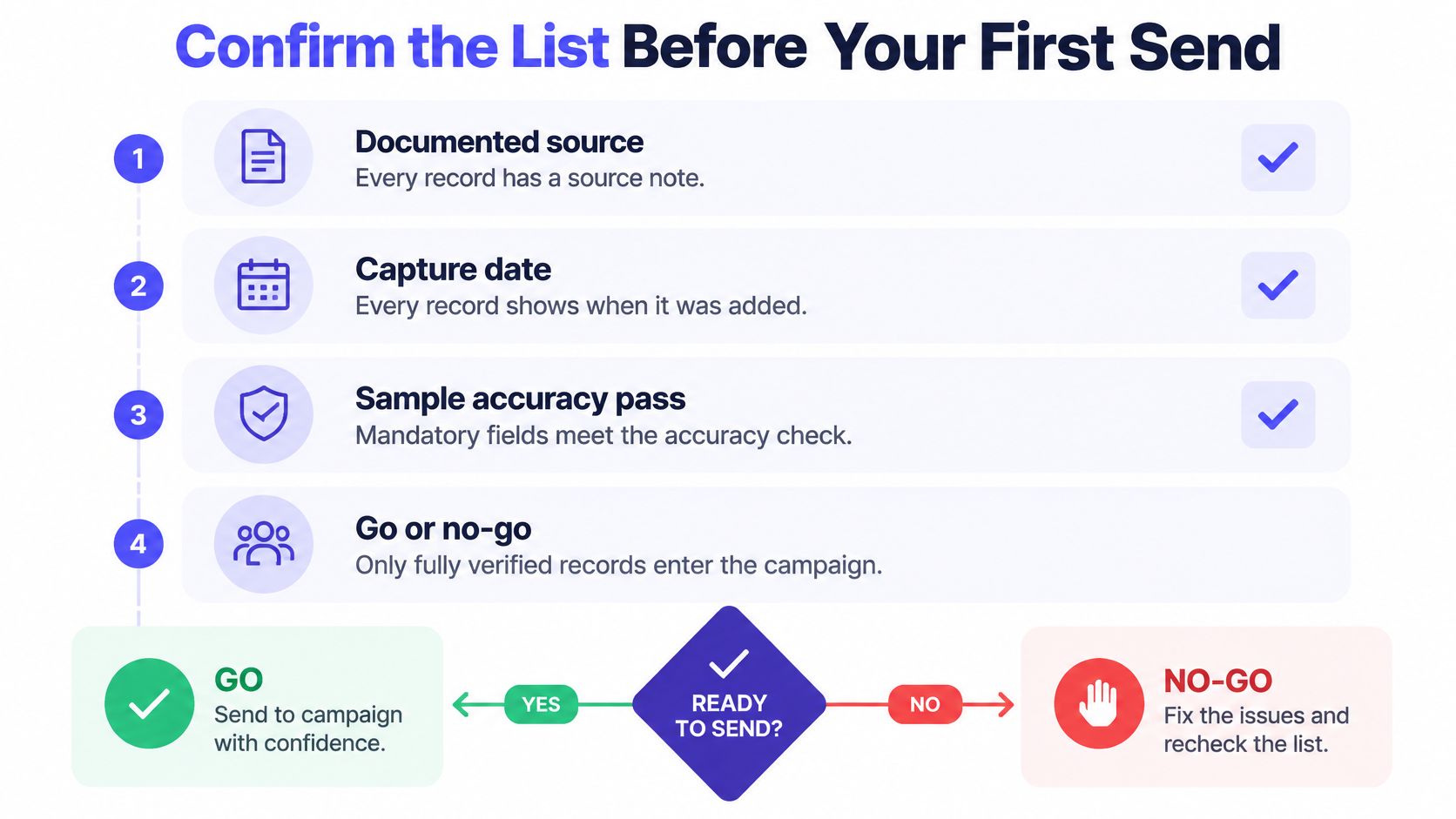
- Documented source and capture date. Every record carries a note on where it came from and when it was captured, so a bad batch can be isolated to one pull.
- Sample accuracy above the agreed threshold. Mandatory fields pass the accuracy check set in advance, measured on the qualification sample, not on the provider's self-reported number.
- Role match confirmed against the buying group. Coverage checked against the economic buyer, evaluator, user, and procurement for the offer, not against one title repeated across the list.
- Stale records quarantined. Anything beyond the freshness limit sits in the quarantine queue with a reason code instead of sitting in the sequence.
- Authentication verified before volume rises. SPF, DKIM, and DMARC pass on every sending domain prior to any increase in daily sends.
- Suppression linked to every sequence. One central list, connected to all active campaigns and shared with anyone sending on the company's behalf.
A list that fails any line goes back to qualification. That isn't a delay, it's the cheapest campaign decision available, because the alternative is paying to damage a domain you'll need for the next two years.
Then run a 30 to 60 day pilot on one segment. Measure accepted-lead conversion by role, drop any role that produces no accepted leads, and expand only the segments that hold up. Review the spam complaint rate against the 0.1% recommended level during the same window, so list quality and sender reputation get judged together rather than in separate meetings.
IronPeak Marketing runs a fit check as its first step, analyzing a client's current situation, target market, and offer to decide whether its cold email system suits the growth goal, and keeps the qualification bar visible after launch by tracking which segments produce accepted leads. The work is done for the client, who attends only the sales calls booked on their calendar. Keeping records current is the same discipline described in this guide to keeping email lists clean.
IronPeak Marketing builds the prospect data and the sending infrastructure that a cold email campaign depends on, from custom sourcing and enrichment through domain setup, warming, and daily inbox management. Its headline target is 60 to 90 qualified leads in 45 days on a pay-per-result basis, so the cost tracks accepted opportunities instead of record counts. Leads that don't meet the qualification standard can be rejected without payment, which puts the data quality question on the provider's side of the table. Visit IronPeak Marketing to see whether the current list is the bottleneck.