How to Test Email Deliverability Before You Scale
How to test email deliverability with inbox placement, complaint rates, and authentication checks before you scale cold email volume.
The advice you'll hear first is to check authentication. Publish SPF, sign with DKIM, land a DMARC policy, and the domain is declared ready. That test proves a mailbox provider accepted the message. It doesn't prove a person ever saw it in the primary tab, and it says nothing about whether the next few thousand sends get throttled or filed away.
Acceptance and placement are separate decisions made by separate systems. Gmail can take every message you send, drop most of them into spam, and never tell you. The parts of a real test that predict revenue are provider-level placement, complaint rate and hard bounces, all measured against delivered mail rather than whatever your sending tool counts as sent.
Opens are not one of those signals. Treating them as one is the most common reason a campaign looks healthy right up until the replies stop.
Deliverability Scorecard Before You Send
A green tick on SPF, DKIM and DMARC is an infrastructure result. It confirms the records exist and the message arrived unaltered. It does not confirm the message reached the primary inbox.
The gap between those two things is wide enough to swallow a quarter of outbound. Benchmark coverage of tested domains found SPF on 93% of tested domains and DKIM on 90%, yet only 63% of tested messages reached the actual inbox while 33% went to spam, according to Unspam's collection of email deliverability statistics. Nearly every domain in that sample would pass an authentication checker. A third of the mail still missed.
Score four rows against delivered mail
Complaint rate is complaints divided by delivered messages, never by sends. Google's sender guidelines put the operating target below 0.10%, roughly 1 complaint per 1,000 delivered messages, with 0.30%, roughly 3 per 1,000, as the line not to cross. Work one campaign: a send of 10,000 messages that generates 20 spam reports sits at 0.20%, under the ceiling and still double the operating target. That account is one bad week from a reputation problem while every dashboard shows green.
Hard bounce rate is hard bounces divided by messages sent. A practical measurement guide from Snov.io treats total bounce of 0 to 2% as healthy, 5% as a serious warning, and sets a hard-bounce target below 0.5%. Hard bounces are the expensive kind. Every retry against a dead address tells the receiving provider the list isn't being cleaned.
Inbox placement is inbox messages divided by successfully delivered messages, not by total sends. Acceptance at the server is not inbox delivery, and dividing by sends rewards a campaign for every message that died in transit. Log primary inbox, other tabs, spam, quarantine and silent non-delivery as five separate outcomes.
Practical rule: if a metric can't be split by Gmail, Outlook, Yahoo and regional providers, it isn't a deliverability metric. It's a mood.
| Metric | Formula | Operating target | Warning or stop |
|---|---|---|---|
| Spam complaint rate | Complaints divided by delivered messages | Below 0.10 percent, about 1 per 1,000 delivered | 0.30 percent or higher, about 3 per 1,000 |
| Hard bounce rate | Hard bounces divided by messages sent | Below 0.5 percent | Total bounce of 5 percent is a serious warning; 0 to 2 percent total bounce is commonly treated as healthy |
| Inbox placement | Inbox messages divided by delivered messages, split by provider | Primary inbox, recorded apart from other tabs | Provider-specific drop while other providers stay healthy |
| Authentication | Header check on Gmail and Outlook test sends | spf=pass, dkim=pass, and DMARC aligned to the visible From | Any fail or misalignment |
| Open rate | Not used as the test | Not a pass metric | Apple Mail Privacy Protection and blocked images distort it |
Open rate isn't a row on this scorecard at all. It moves with image loading, privacy features and tracking before it moves with placement, so it can't confirm or deny that mail reached a human.
Build the scorecard per sending domain and per dedicated inbox, not per client. On a multi-domain setup, one inbox carrying the weakest segment can drag down a domain that would otherwise place cleanly. Fill every row on a live campaign before changing copy, adding a domain or raising volume, and read the breakdown of email delivery rate alongside it. A high delivery rate with weak placement is the most misleading number in outbound.
Gmail and Yahoo Rules That Change the Test
A 200-message seed test can come back clean and still tell you nothing about next month. The rules that govern your sending change at volume, and they change at a specific, published line.
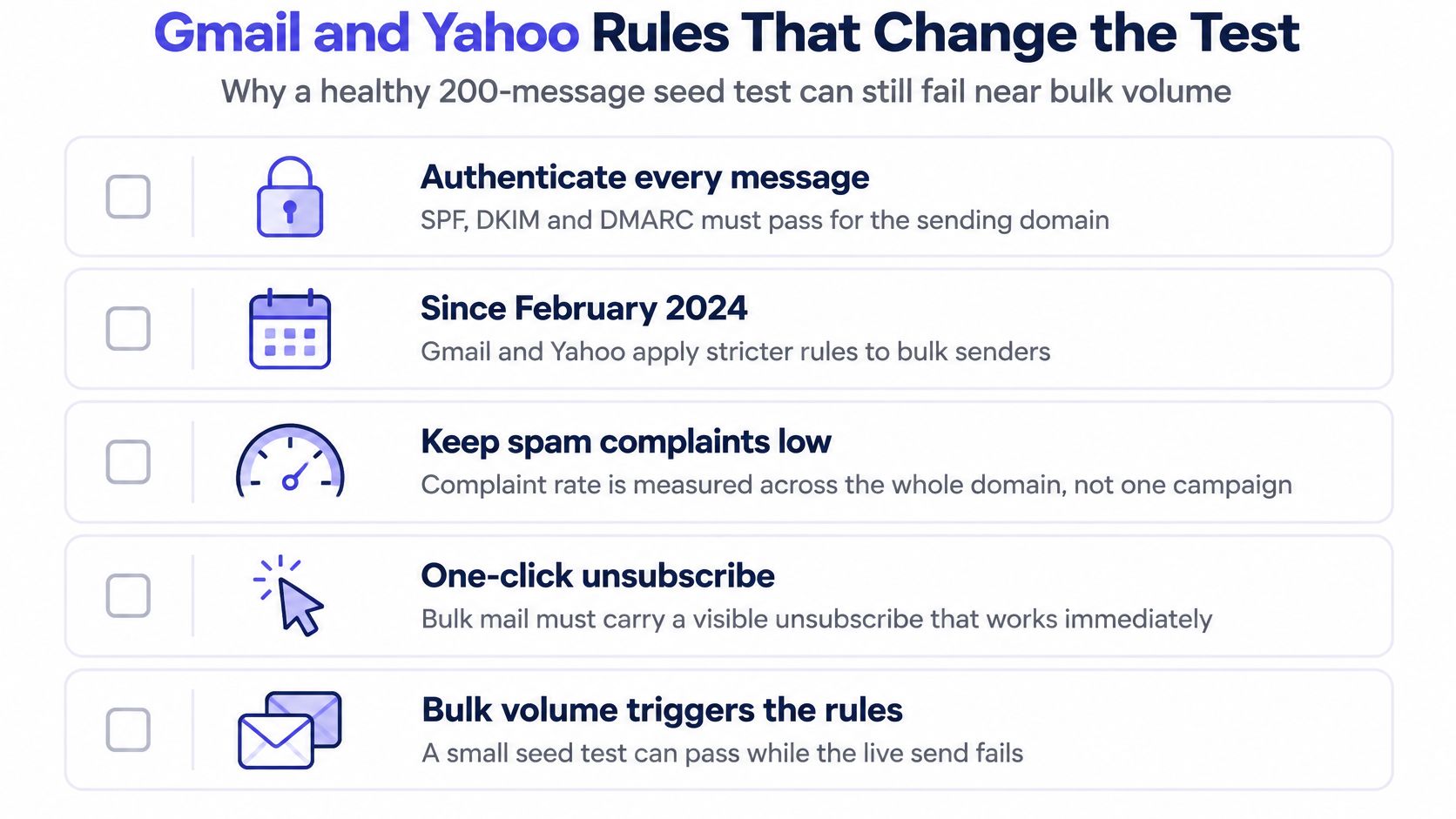
Since February 2024, Gmail and Yahoo apply stricter requirements to bulk senders, generally defined in that guidance as senders pushing at least 5,000 messages per day to recipients at either provider. Below the line, the exercise is placement. Above it, the exercise is compliance with placement attached.
The checklist below is what a bulk sender has to prove on request.
What Gmail expects from a bulk sender
Both SPF and DKIM authenticating, not one or the other. A published DMARC policy. Alignment between the authenticated domain and the visible From domain, because a signature on a domain nobody sees in the From line buys nothing. TLS in transit. One-click unsubscribe on promotional mail.
Google's stated enforcement sequence ran from temporary errors for noncompliant traffic in February 2024 to rejection of a percentage of that traffic from April 2024, with enforcement increasing over time. A sender that passes at low volume and fails at bulk doesn't get a polite note. It gets errors in the log and mail in the spam folder.
Yahoo adds a complaint ceiling and a live opt-out
Yahoo's sender best practices require SPF or DKIM at minimum, a spam complaint rate below 0.3%, and a functioning one-click unsubscribe for marketing and subscribed messages. Yahoo points specifically at the RFC 8058 List-Unsubscribe-Post method and says unsubscribe requests should be honored within two days.
That produces checks an authentication scan won't catch. The message must carry a List-Unsubscribe header supporting one-click removal. The endpoint must work without asking the recipient to log in. Suppression has to remove the address from every active sequence, including scheduled follow-ups and manually uploaded lists. A visible unsubscribe link in the body is not a substitute for the header.
Do the arithmetic once. For 20,000 messages delivered to Yahoo, 0.3% equals 60 complaints. That's a ceiling to stay under, not a target to manage toward.
Retest point: before any ramp that pushes a domain toward 5,000 a day at either provider, rerun authentication and placement from scratch. The volume itself is the changed variable.
How to Run a Four-Stage Placement Test
Warming isn't a stage of the test, it's the precondition. A new domain or a fresh inbox that starts at a small, steady daily volume and climbs only while placement holds will pass these stages. One that launches at full volume will fail stage three and take weeks to recover.
Address validation comes before the first seed send, and it's a step many teams skip. A 2025 survey of 421 U.S. businesses, run by Centiment for Kickbox's email deliverability report, found that 23.6% verified their email lists before every campaign. The other three quarters send into addresses that will bounce and complain, then wonder why placement moved. Validate every address, cut the hard-bounce risks, then test.
The four-stage sequence set out in Google's sender guidance maps cleanly onto a preflight and a pilot. Each stage needs a check, a piece of evidence, and a condition that stops the run.
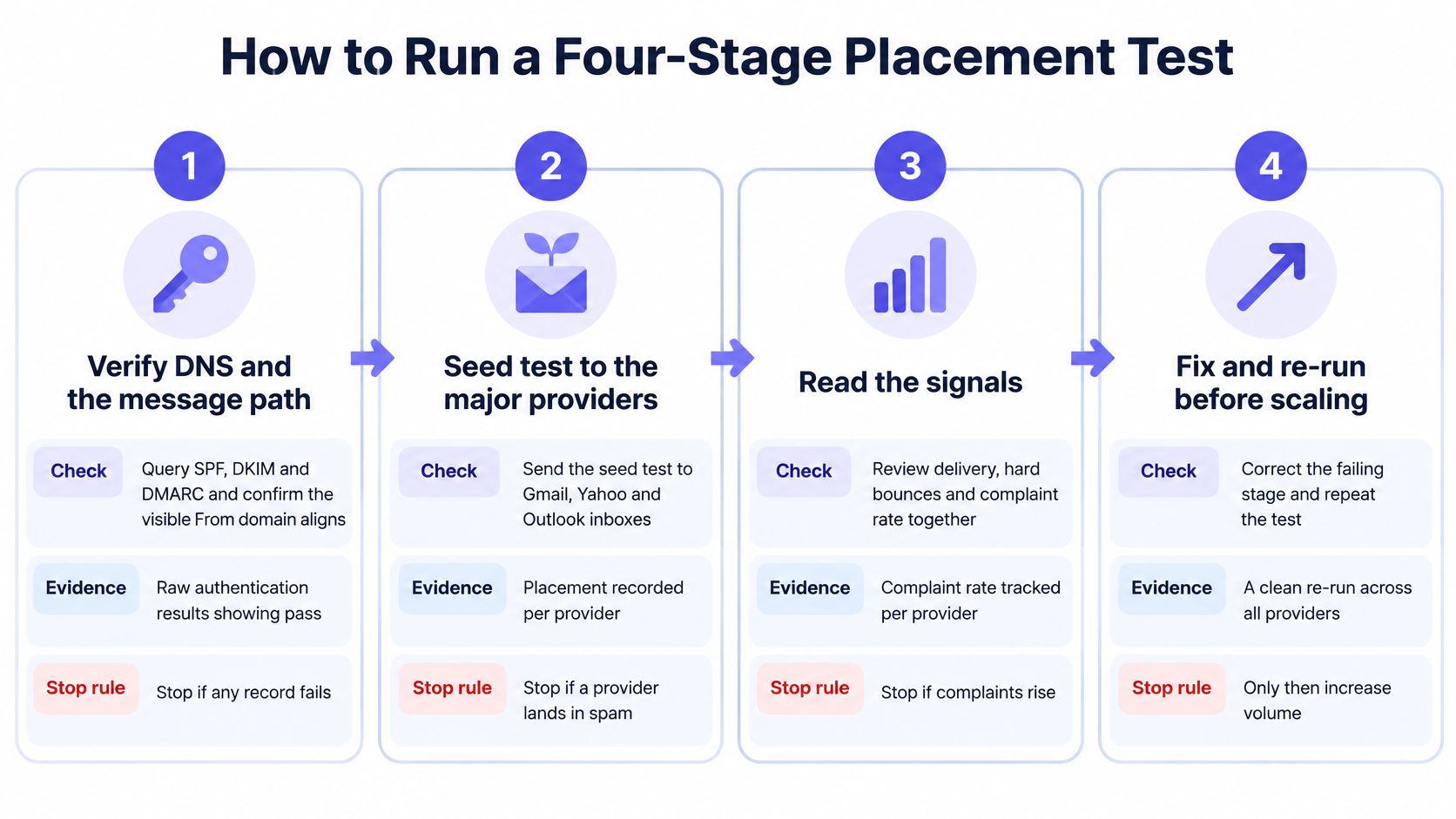
Verify DNS and the message path. Query the SPF, DKIM and DMARC records and confirm the visible From domain aligns with an authenticated domain. Check reverse DNS, TLS, the link domain and a working one-click unsubscribe header. The evidence is raw authentication results from a Gmail send and an Outlook send showing a pass. Stop on any fail or misalignment, before a single seed send goes out.
Inspect reputation and infrastructure. Look at each sending domain and each dedicated inbox separately, and note whether the domain is still warming. A blocklist hit is context, not proof: a listing alone doesn't establish that mail missed the inbox, so corroborate it against placement and complaint data before you pull a domain out of rotation.
Run the controlled placement test. Use a seed panel with several Gmail, Outlook, Yahoo and regional mailboxes, and send the actual template rather than a plain-text placeholder. Log primary inbox, other tabs, spam, quarantine and non-delivery as separate outcomes, and calculate placement on delivered mail. A provider-specific failure usually points at authentication, reputation or content on that one domain, not at a universally bad campaign.
Validate a small live pilot. Only once authentication is clean. Track delivery, hard bounce, complaints, placement, unsubscribes and reply quality by sending domain, inbox and provider. Give the pilot enough delivered volume to mean something before making a scaling call. Any authentication failure, sudden block or complaint spike stops the run immediately, without waiting for statistical confidence.
Take a worked example. 24 seeds accept the message. 19 land in the primary inbox, 3 in spam, 2 in other tabs. Placement is 19 divided by 24, about 79%. That figure only becomes useful once it's split by provider. If Gmail shows 20 of 24 and Outlook shows 11 of 16, the aggregate hides a provider that's failing and the fix belongs on the Outlook side.
Repeat all four stages after any DNS edit, new-domain ramp-up, major copy change or material volume increase. Warm-up sends never count as evidence of placement, because they go to mailboxes primed to accept you. Keep the address side tight with a proper approach to clean email lists before the panel runs at all.
Auth Failure Versus Reputation Versus Filtering
The header is the first thing to read and the last thing many teams check. Before touching copy, subject lines or volume, pull the raw authentication results from a test send to Gmail and to Outlook. If SPF fails, DKIM fails, or the visible From domain doesn't align with an authenticated domain, the message has an identity problem. Stop sending and fix the records. Rewriting copy to cure an authentication break burns a week and changes nothing.
Match the symptom to the layer underneath
Once authentication passes, every remaining symptom has a narrower set of causes. Sorting them before acting is what stops a team from damaging a good domain with the wrong fix.
| Signal | Usual cause | Next move |
|---|---|---|
| spf=fail, dkim=fail, or DMARC misaligned | Authentication or From-domain alignment break | Fix DNS and alignment before more volume |
| Auth passes, one provider in spam | Reputation or provider-specific filtering | Inspect that domain, inbox, and Postmaster data |
| Auth passes, placement drops after a copy or link change | Content or tracking-domain filtering | Roll back the template and retest |
| Hard bounces climbing | Invalid, catch-all, or role-account data | Stop, suppress, and recheck enrichment |
| Complaints rising while replies continue | Targeting or expectation problem | Pause volume and honor opt-out immediately |
| Delivery rate high, inbox placement weak | Accepted mail is not inbox mail | Do not scale on delivery rate |
| Blocklist hit with healthy placement | A listing, not proof of inbox failure | Corroborate with placement and complaints |
| Gmail complaints above 0.30 percent | Risk of losing delivery mitigations | Hold until under 0.30 percent for seven consecutive days |
The complaint number has a harder edge than the rest. Google's sender guidelines state that bulk senders with a user-reported spam rate above 0.30% can lose access to delivery mitigations, and eligibility returns only after that rate stays below 0.30% for seven consecutive days. The spam rate shown in Google Postmaster Tools is the figure that counts, not the complaint count sitting inside one campaign tool. For a Gmail send of 10,000 messages, 0.10% is 10 reports and 0.30% is 30.
A campaign producing replies and 30 complaints per 10,000 Gmail deliveries has crossed a stated risk boundary. Replies don't buy the mitigations back.
Change one variable, then rerun
If authentication passes and only one provider files you in spam, treat it as reputation or provider filtering on that domain or inbox. Check the domain's history, the Postmaster data and any recent volume jump. If authentication passes and placement drops across providers right after a template, link or tracking-domain change, roll the content back instead of pushing more volume through a domain you're about to damage.
If hard bounces climb, stop the sequence, suppress invalid and risky addresses, and review catch-all and role-account handling plus the enrichment source. Retrying permanent failures compounds the reputation hit.
If complaints rise while replies keep arriving, the mail is landing and the list or the offer is wrong. Pause volume, remove disengaged recipients, and make opt-out immediate. When signs of email delivery issues show up in several places at once, the layer is usually list quality rather than infrastructure.
Change one thing at a time, then rerun placement by provider, domain and inbox. A high delivery rate with poor inbox placement is a failed test, whatever the dashboard says.
Scale or Hand Off the Sending
A clean four-stage run buys a green light for one campaign, not a permanent one. What follows is a daily operating question: who watches placement, complaints and bounces per provider, and who acts on drift before it costs a month of pipeline.
The signals that replace an inbox screenshot
Track six things, and split every one of them by provider, sending domain and dedicated inbox:
- Delivery rate: whether the receiving server accepted the message at all.
- Hard bounce rate: whether the list is degrading underneath you.
- Complaint rate: whether recipients are telling Gmail and Yahoo the mail is unwanted.
- Inbox placement: whether accepted mail landed where a human would see it.
- Unsubscribe behavior: whether the message was relevant enough to keep.
- Positive replies and CRM outcomes: whether any of it became a conversation worth having.
One weak inbox inside a healthy domain is the failure mode aggregate reporting hides. A domain-level average stays green while the single inbox carrying your worst segment pulls the whole domain's reputation down. Report at inbox level and the problem shows up a week before the complaints do.
What opens can and can't tell you
Apple Mail Privacy Protection can preload email images, generating opens nobody made, and Zoho's deliverability guidance on Apple's Mail Privacy Protection recommends judging clicks, replies and conversions instead, while noting that one 2026 benchmark reported primary-inbox placement rising from 49% in 2025 to 63% in 2026, with major placement variation still showing up by provider. An average built from a strong provider and a weak one describes neither.
The honest picture of a live campaign looks more like this than like a single inbox screenshot.
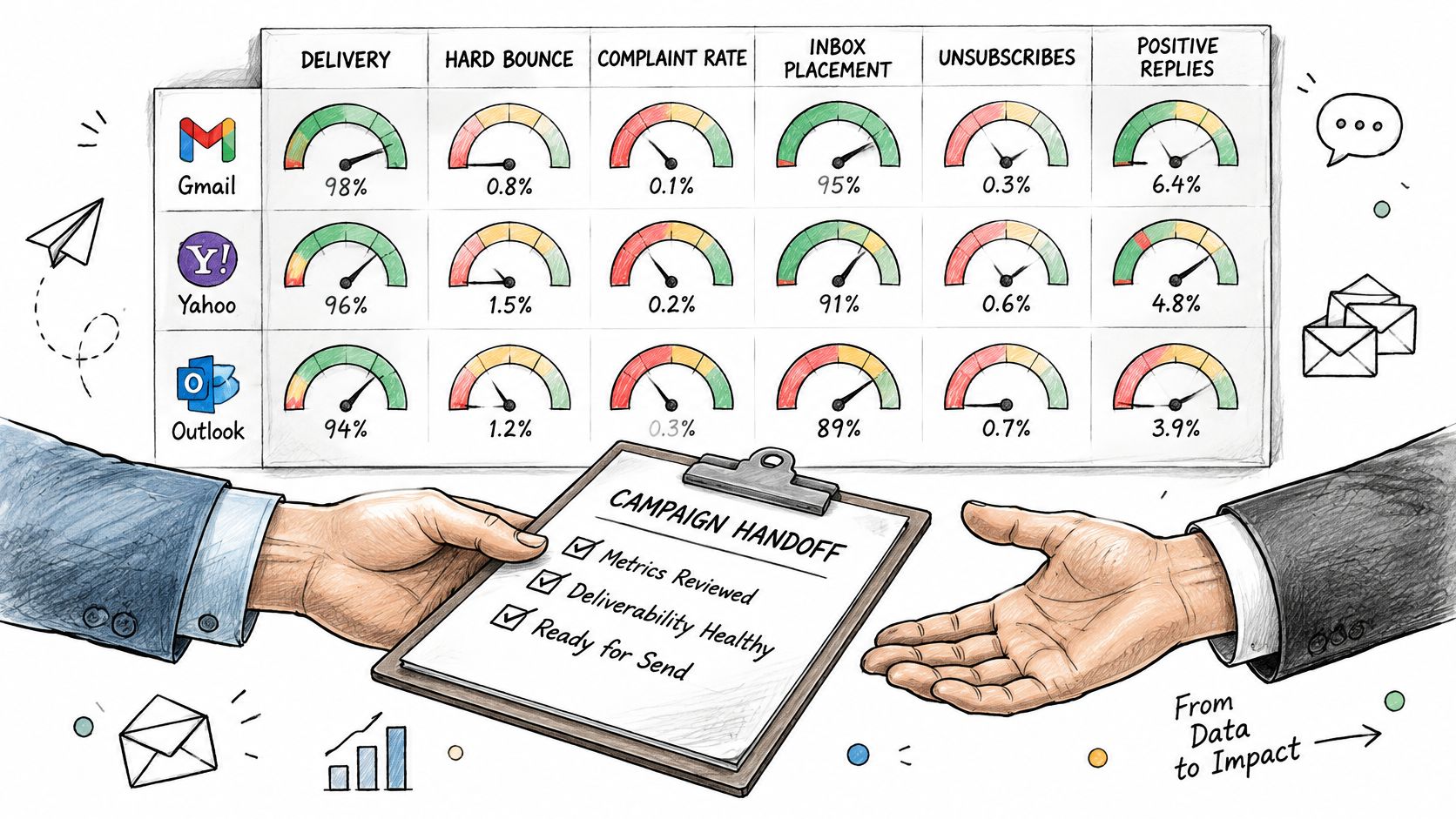
Open data still earns a place as a diagnostic slice. Segmented by mailbox provider and mail client, it can hint at filtering. Treated as proof of inbox access, it does nothing but mislead.
When to keep sending in house
Keep sending in house while three conditions hold through a gradual ramp: authentication stays aligned on every sending domain, placement holds at each provider on the panel, and hard bounces and complaints stay inside the operating bands set before launch. Raise volume in steps on warmed domains, and rerun placement after every copy change and after any jump in daily sends. Those are the two changes mailbox providers react to fastest.
Not a green light: a reply spike arriving in the same week as a complaint spike is two signals pointing in opposite directions. The complaint wins. Pause the ramp and find out what the volume change caused.
When the operation, not the offer, is the problem
Hand daily sending to an operator when nobody in the business can check domains, inboxes, enrichment and follow-ups every day. That's the honest limit for most B2B founders. The offer is fine, the data is fine, and the sending still degrades because nobody noticed the complaint rate tick up on a Tuesday.
Repeated tests showing the same pattern, clean authentication, reasonable replies and placement that keeps sliding, point at operational capacity rather than messaging. The next step there isn't a bigger send, it's a fit check. IronPeak Marketing runs that check as step one, analyzing the prospect's current situation, target market and offer to decide whether its cold email system fits their growth goals before any domain gets built. Charlie Bennett co-founded IronPeak Marketing and handles operations, the tech stack, deliverability, data enrichment and the systems that keep leads flowing into clients' calendars, which is this work done as a full-time role instead of a Friday afternoon.
Scale when the numbers say the machine is stable. Hand it over when the numbers say nobody is watching the machine.
IronPeak Marketing runs the sending side of cold outbound for B2B teams, from custom domains and dedicated inboxes to domain warming, copy, data enrichment and the daily inbox work that keeps placement intact, on a pay-per-qualified-lead basis with a target of 60–90 qualified leads in 45 days. Before any of that starts, the team looks at your offer, market and current acquisition setup to decide whether cold email is the right channel at all. Book a free strategy session with IronPeak Marketing to get a straight read on whether your deliverability problem is technical or operational, with no credit card required and no commitment.